
vSEC Devices
The vSEC devices is the part of the application that exclusively serves the needs of management of vSEC cards.
Available actions for user with appropriate privileges:
Displays a list of vSEC devices (the list is not available when you open the page, but you have to enter some search parameter and search)

Removes vSEC devices.

Creates a request to issue a new vsec card within the device.
List of vSEC devices
1
Open the vSEC Devices option in the Operational Console menu.
2
New page with the empty list of devices will be displayed
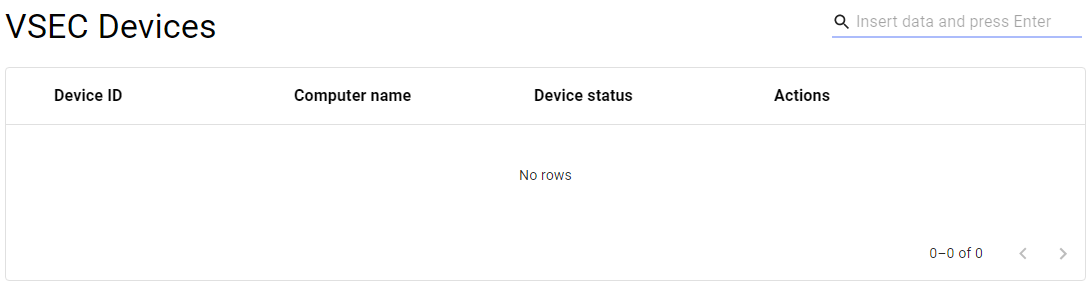
3
Search for the desired device - use the Search function
[  ].
].
4
The relevant devices will be displayed
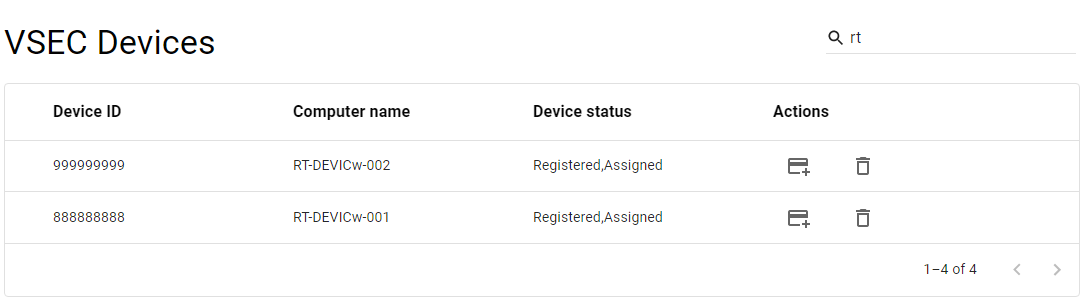
5
Mouse click on the record will display list of vSEC cards connected to specific vSEC device.

Delete vSEC devices
1
Open the vSEC Devices option in the Operational Console menu.
2
New page with the empty list of devices will be displayed
3
Search for the desired device - use the Search function
[ ].
4
The relevant devices will be displayed
5
Press the DELETE button [ ] within the chosen device
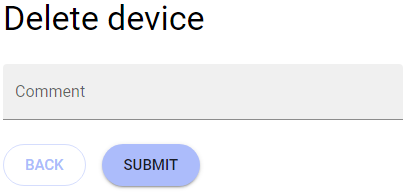
6
New page for confirmation of deletion is displayed
7
Insert the reason and press SUBMIT button
8
The device will be deleted.
Issue a new vSEC card in the device
1
Open the vSEC Devices option in the Operational Console menu.
2
New page with the empty list of devices will be displayed
3
Search for the desired device - use the Search function
[ ].
4
The relevant devices will be displayed
5
Press the ISSUE NEW CARD button [ ] within the chosen device
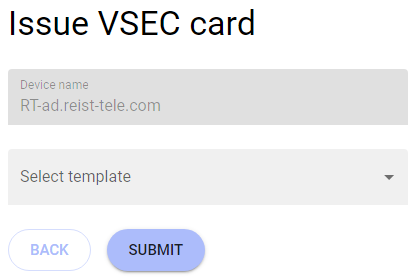
6
New page for specification of the card will be displayed
7
Choose the relevant template and press SUBMIT button.
8
New card will be issued.