Email Token
Email token is a way of verifying the user's identity by means of an email message. If the user has enrolled this token, when asked to enter the one-time-password (OTP) when logging into the application, the user receives an email with OTP that needs to be entered into the system. If the OTP is entered correctly, the user's identity is verified and the login occurs.
Email token enrollment process
|
1
|
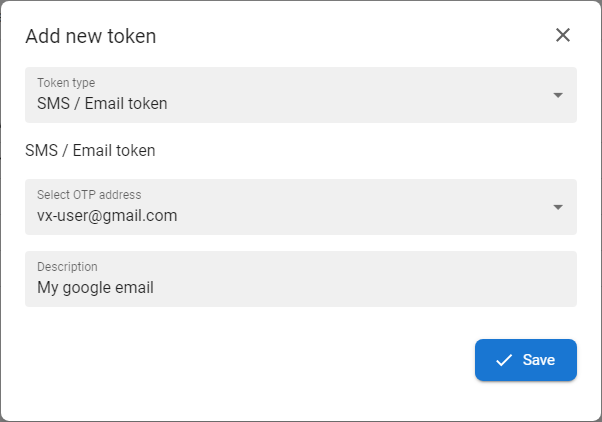
Choose the the Email token template from the the Token type drop down menu.
- The template name depends on administrator settings
|
|
|
2
|
Select the email address.
- When this token is used, an OTP will be sent to the selected phone number.
- The list of email addresses contains the data entered
during during Enrollment or in the the Information update section
|
|
3
|
Optionaly insert insert Description of the token.
- The display of the Label field depends on administrator settings
|
|
4
|
Press Press SAVE button to finish the enrollment and to activate of the token.
|
Email token test process
|
1
|
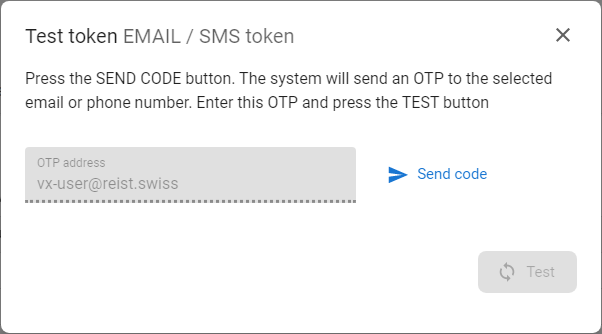
Press the the SEND CODE CODE [  ] button.
- OTP address field contains the contact details defined within
the the token enrollment
|
|
|
2
|
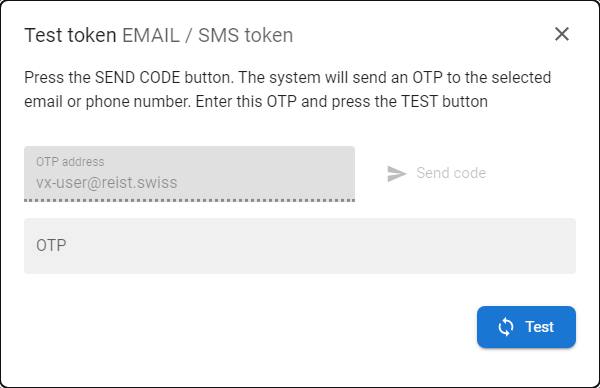
The system will send OTP to defined email address.
|
|
|
3
|
Insert received OTP to the the OTP field and press button button TEST - if the OTP is correct then the message about successful test will be displayed.
|