
Release Notes
Upcoming release
December 9, 2025

User Interface Elements
User preferences individual category reset
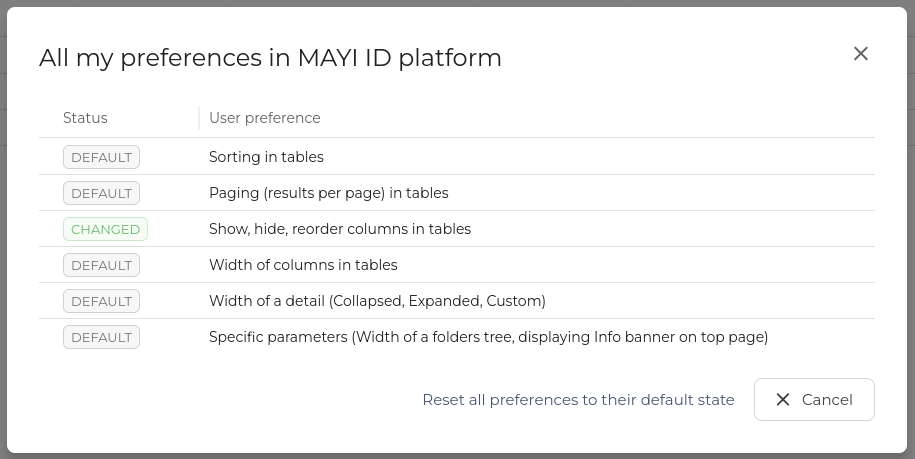
We have enhanced the reset user preferences experience by adding the option to reset each category separately, so the user doesn't have to go back to full default settings.
Latest Releases
2025
November 18, 2025

Operational Console - Invitation improvement
The invitation process in Operational console was enhanced with auto-completion for invitation templates.
October 29, 2025

User Interface Elements
Information header dismissal
We have added an option for the users that can permanently hide individual information banners. This can be reverted by resetting the user preferences in the profile.

October 6, 2025

User Interface Elements
Entity status was re-done as a system-wide update to help with consistency and to also show if the user action is necessary at the moment.
September 16, 2025

Access Management - Operations - Invitations superadmin
We have added an option for admins to see all invitations created in a tenant. In the table you can see invitation details (name, email, phone, etc.) as well as the user who created the invitation. The reason for this: When an invitation creator is away or cannot access their account, the invitation cannot be updated nor seen by other users who might need it.
Timezone system adjustments
We have redefined how the system handles the timezones. The system used to work on the Swiss time, regardless of where the user was, now the system adapts to the user's timezone (and summer/winter time) and provides relevant information. This can have beneficial effects on certificate management and overall understandability of the time accurate information.
User Interface Elements
Object Interlinking
We have introduced changes, that eliminate unnecessary steps in users' workflow. When looking at detail that contains other entities in the system, the option to click them as a link to said entity was added, without the need to go to the related part of the system and search for them.
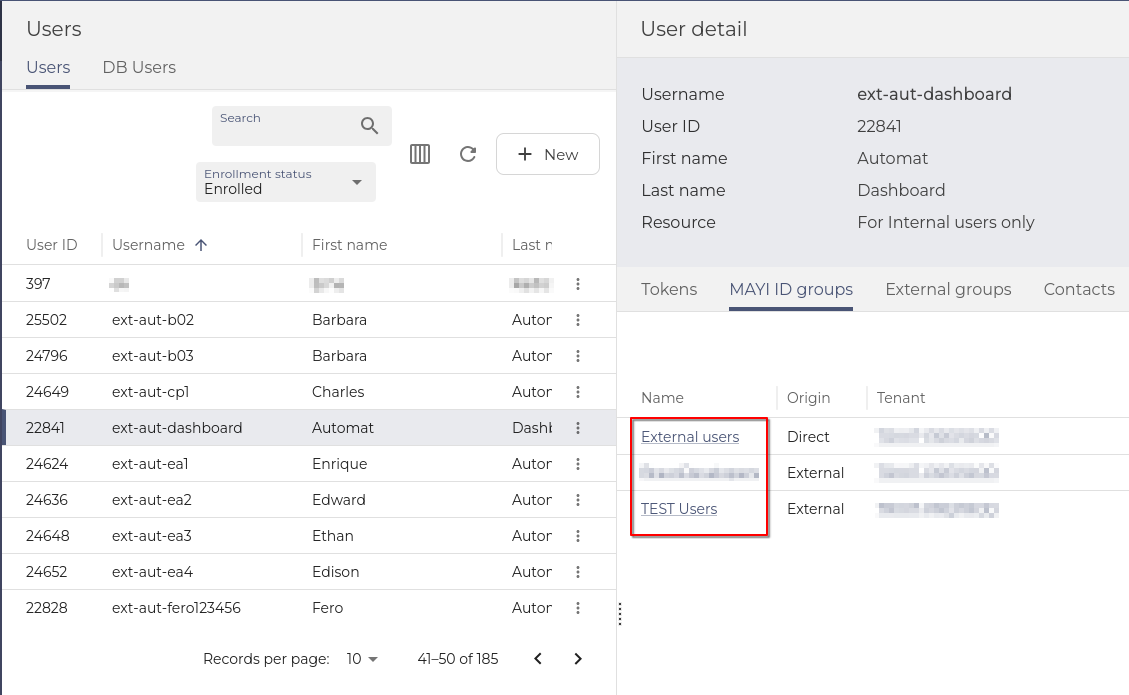
With RBAC and privileged access in mind, users can see the links only for entities, they have privileges to.
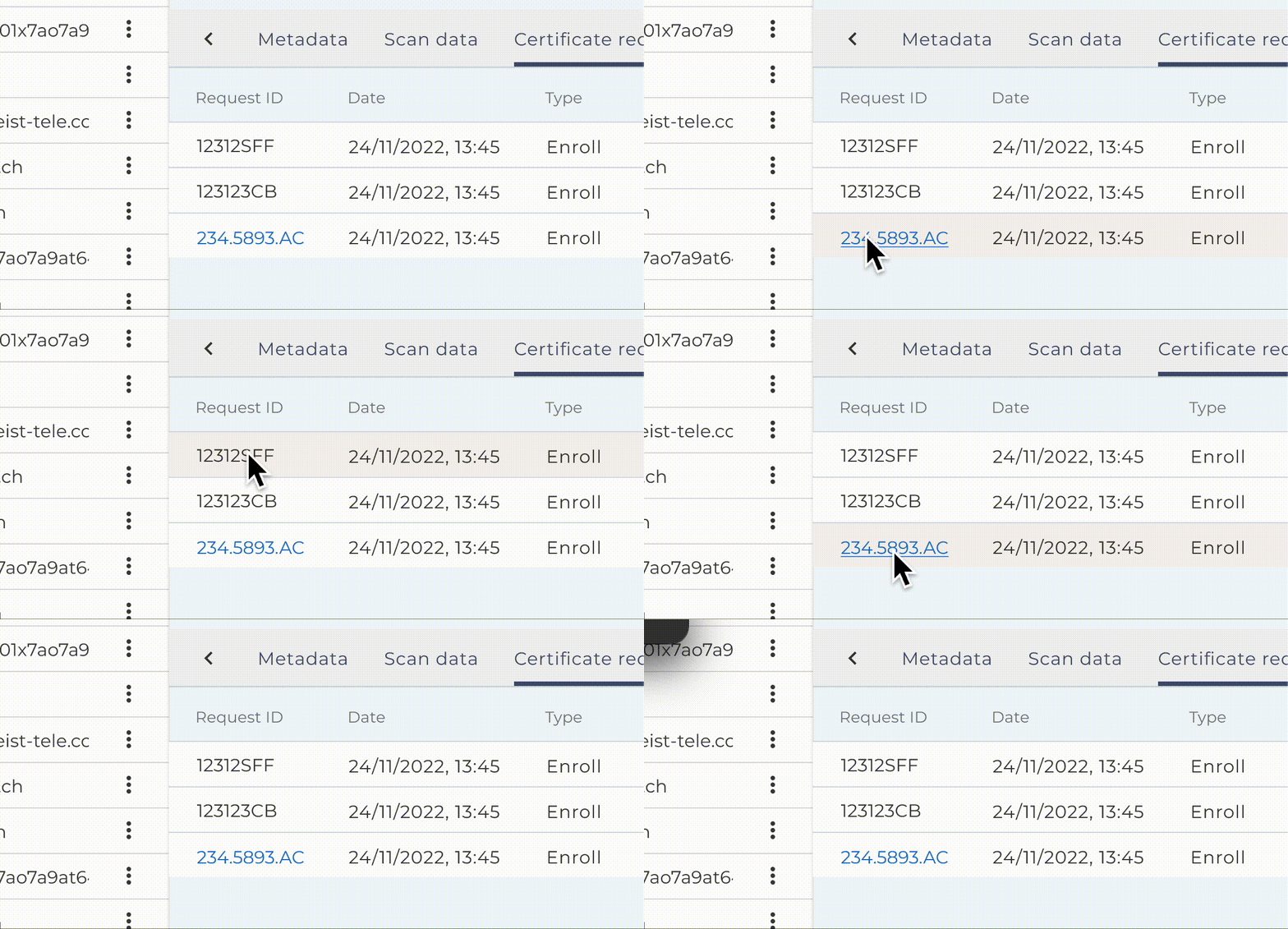
Invitations unification
Changes were made, so the table columns in My Invitation in SelfService looks the same as All Invitations in Operations.
August 26, 2025

Vault - linking the entities
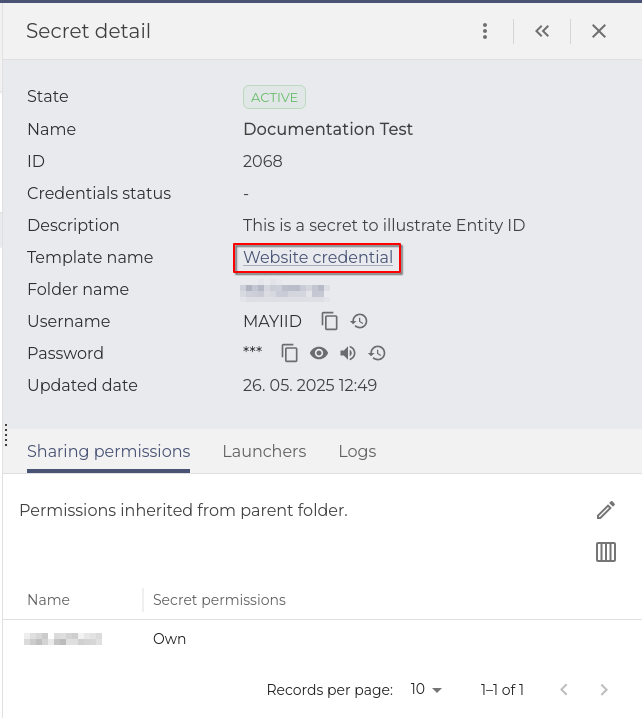
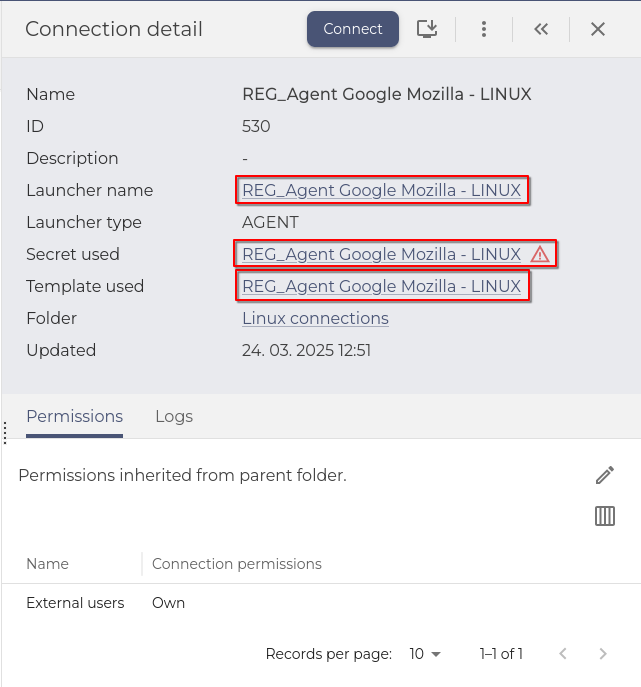
When in Vault, users can now use the full potential of interlinked objects in the Vault. In Secret's Detail, templates or connections can be clicked as links to the entities of the system. This eliminates the need to search for templates, connections, etc. to find out the properties of the linked items.
 |
 |
vSEC device functionalities decommissioned
All vSEC functionalities were decommissioned in this release.
Tenant Admin Console (TAC) + Dashboard - Default icons for applications
Application icons were added to represent the MAYI ID applications and miscellaneous (Keycloak, Safewalk, ...). The icons are corresponding to the left menu icons.
User Interface Elements
Filters and the action bar changed to stick to the top of the table
We have enhanced the experience with tables with many entries. Filtering and control elements now stick to the top part of the table when the user scrolls down the table.
Dashboard widgets were polished
Dashboard creation was enhanced with better descriptions, and the widgets default width and height were changed to fit the dashboard screen better. Paging of the widgets was redefined from rows per page to records per page. Those changes should provide cleaner dashboards with more intuitive creation.
Global reset of user preferences
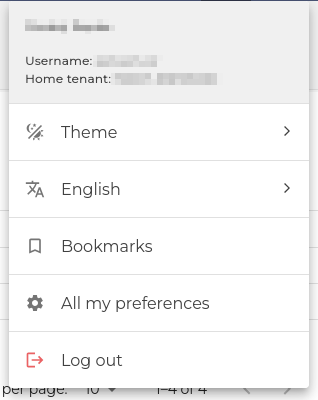
In the previous release, we introduced table column customization and a reset mechanic. It was decided to also introduce a global reset option that can be found in the Profile section of the top bar. In the section All my preferences. Users can also see what type of changes they have made to their tables.
Checkboxes and selectors consistency
When selecting checkboxes, radio buttons, or switches, users can now also click the text to make a selection, not just the selector.
July 15, 2025

Enrollment — Security questions flow unification
Adding security questions in the enrollment process was changed to be the same as in Selfservice, unifying the workflow and not confusing the user with two methods for the same process.
User Interface Elements
Table column customization changes and reset
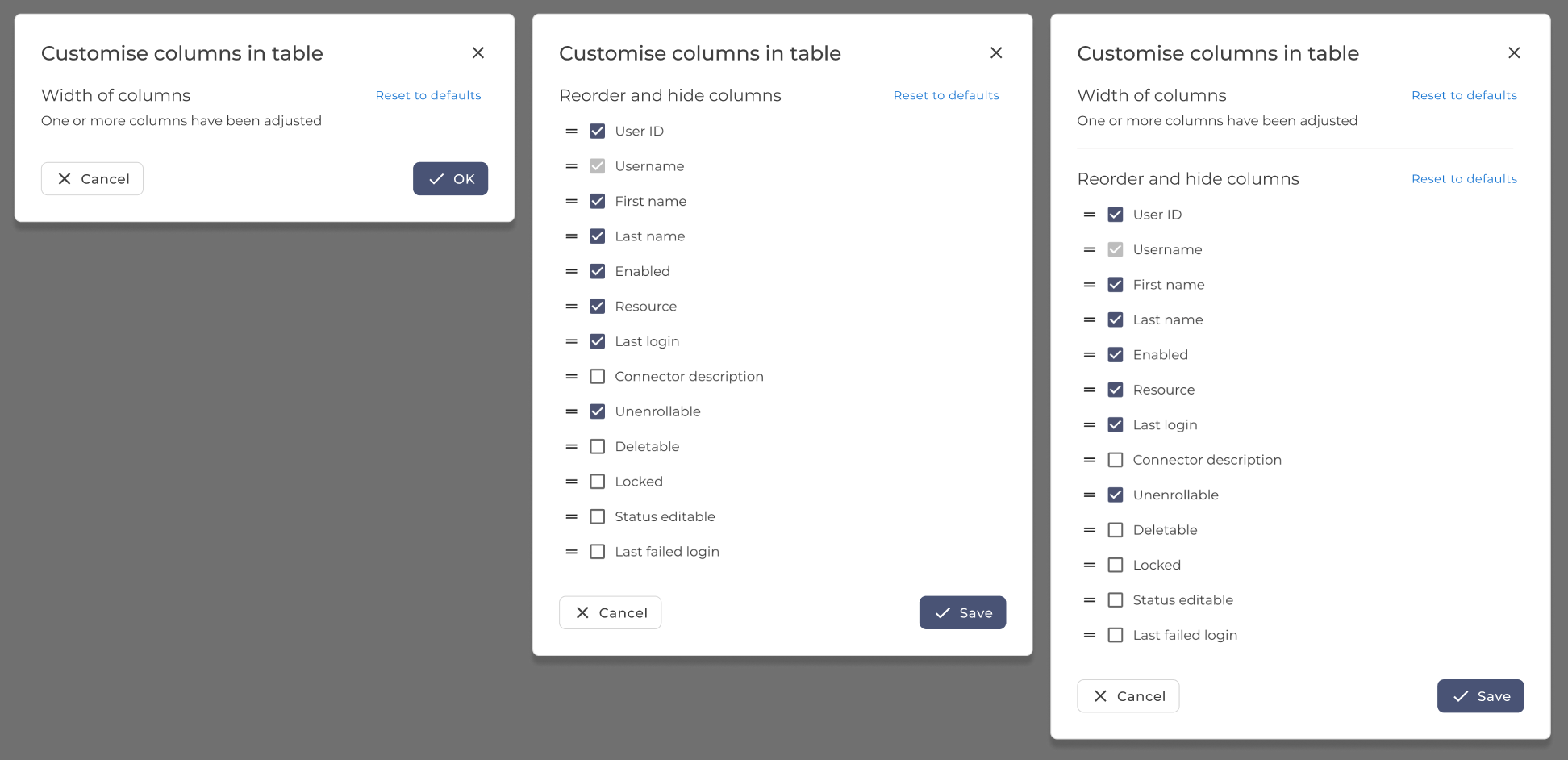
The option to reset user column changes (column width) was added, and in the case of the table with customizable columns, also hidden and reordered columns can be reset to defaults.
Expandable drawer persistence changes
The expandable drawer size is now consistent for each page separately. Making the customization more useful for more uses and applications.
Autocomplete multi-select input
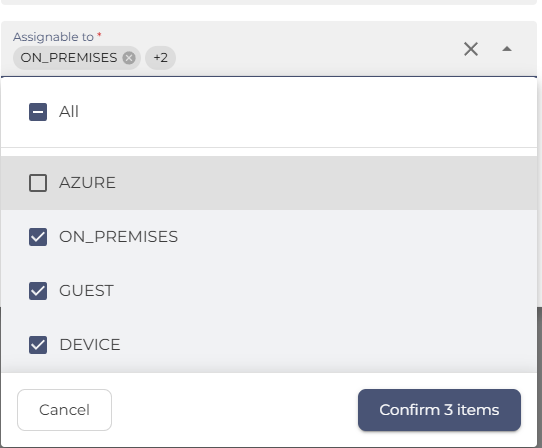
The autocomplete multi-select input was greatly improved to ease the use of multi-select. Users can now check and uncheck entries and use autocomplete to search for them in long lists. The all items choice might not always be displayed because the system does not fetch all items for security reasons.
Unselect all from multiple pages
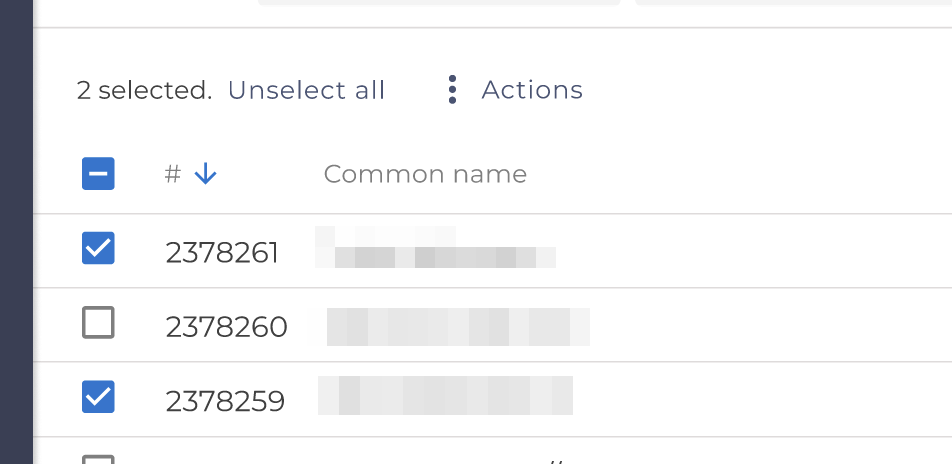
When the user has selected items on multiple pages in a table, an unselect button will show up to allow the user to unselect all.
User preference storage changes
We changed how the system stores user preferences, with most settings saved in the local storage. Column settings in the main tables, GUI Theme and bookmarks saved in the system.
List selection updates
List selections were changed to separate All and None selectors from the rest. Some lists were enriched with icons, for more intuitive orientation.
June 24, 2025

Verification Questions renamed to Security Questions
To comply with standards of industry and branding, we renamed the Verification questions to Security questions everywhere in the system.
User Interface Elements
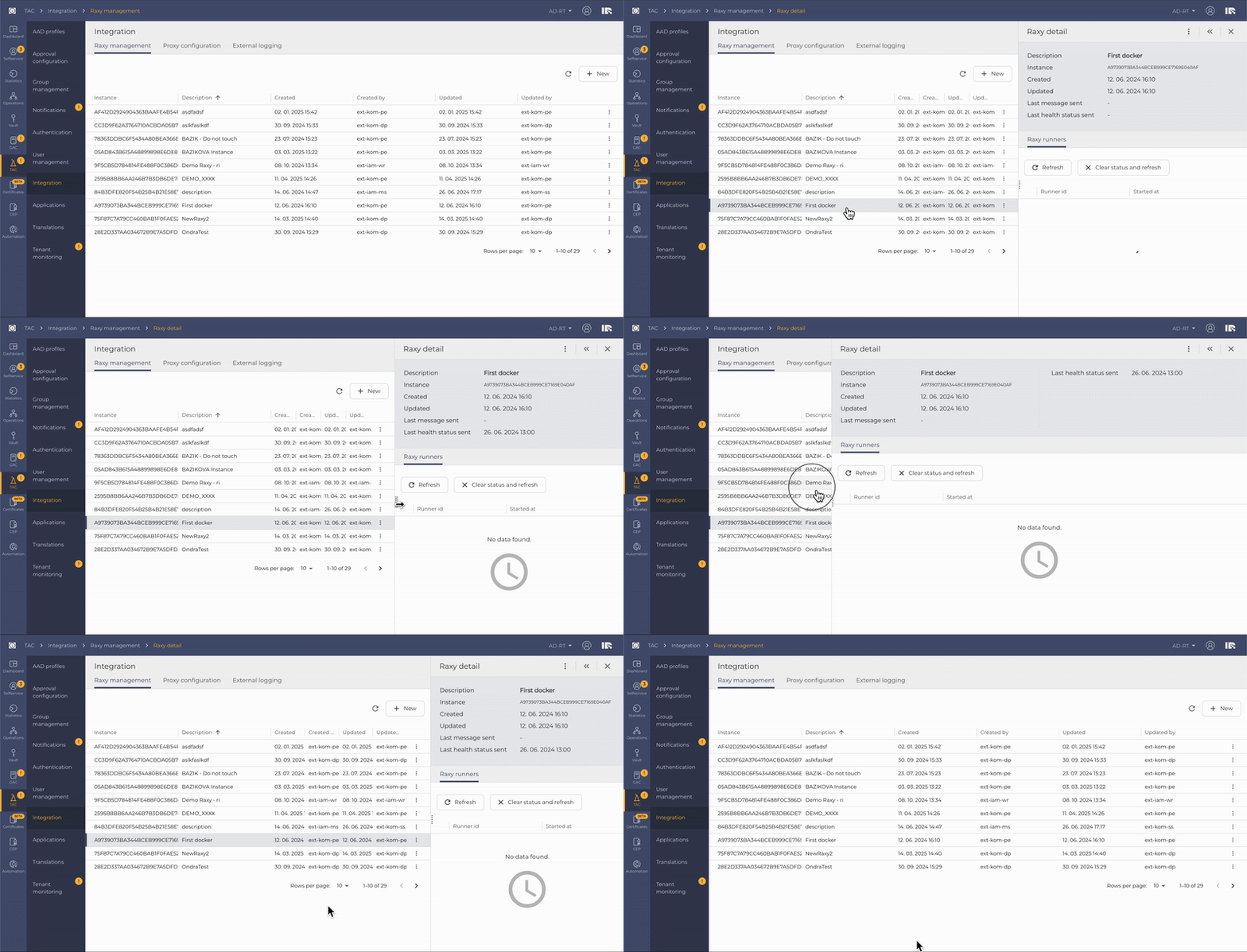
More intuitive and easy way to work with the expandable drawer feature — Expandable drawer can be now resized depending on user preference by dragging it left or right
June 3, 2025

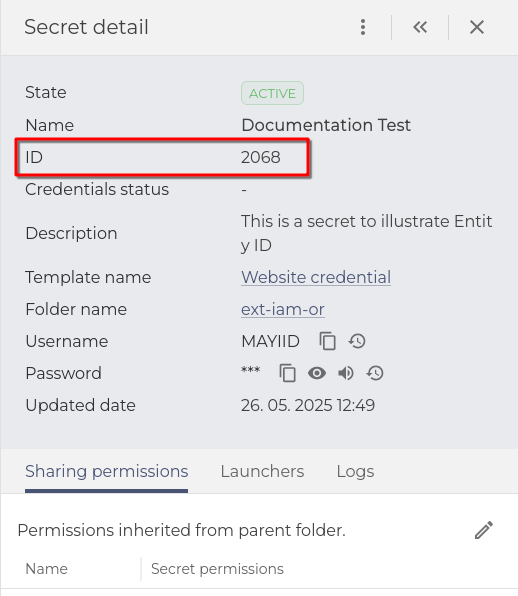
Vault - Display Entity ID in Detail
We decided to clearly show the IDs of vault entities. Mostly because the ID is the unique identifier for most vault items, and names can be the same or similar, which can make it confusing for admins and users with privileges to see many entities. This will also be useful in the future for the Automation Portal.
User Interface Elements:
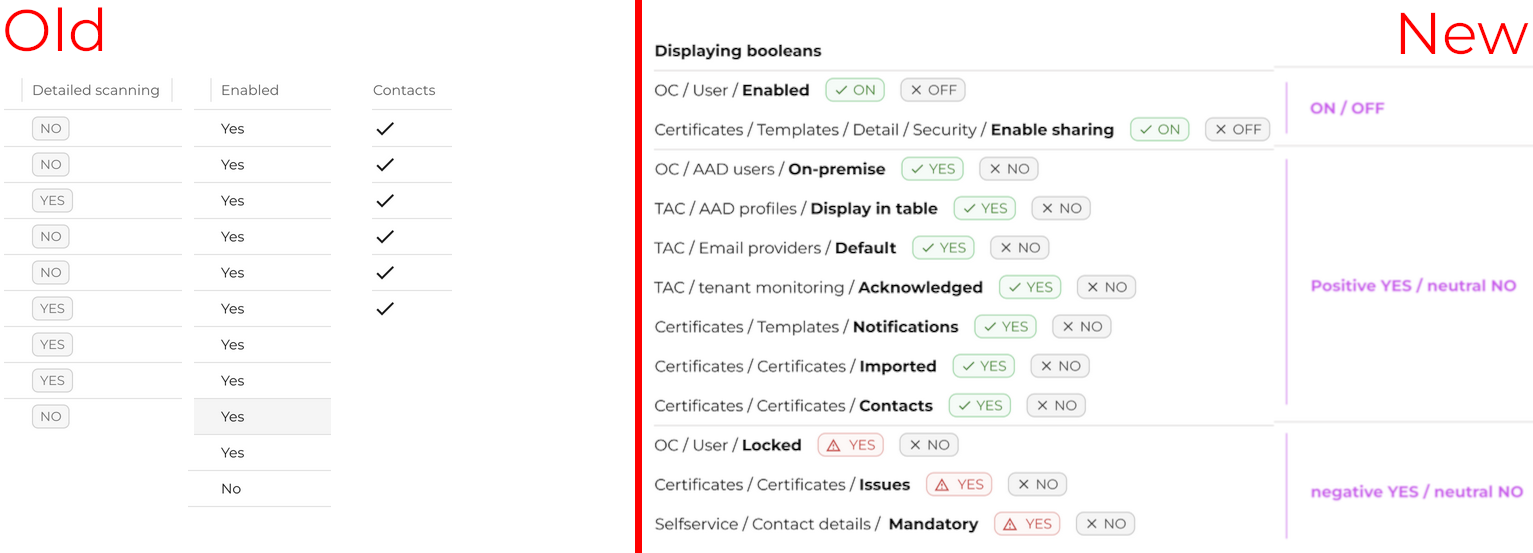
Displaying Booleans in tables -
A System-wide upgrade was put in place to better illustrate Boolean values in tables. The values now, by default, express positive/negative states in a more understandable way. For example, a locked user is now gray if not locked (default) and red with an exclamation mark if locked.
Change tables to cards -
Tables that can contain only one item were changed to cards; this hints to the user that there can only be one entry while making the text more readable.

May 13, 2025

Magic questions to Verification questions - unification throughout the system
The name of the feature was unified with the Administrator terms, thus changed to Verification Questions in every platform module containing this feature:
-
- Selfservice
- Tenant Admin Console - TAC
- Enrollment
- Emergency Access
- Automation Portal
Operational Console - Contacts displayed in the table
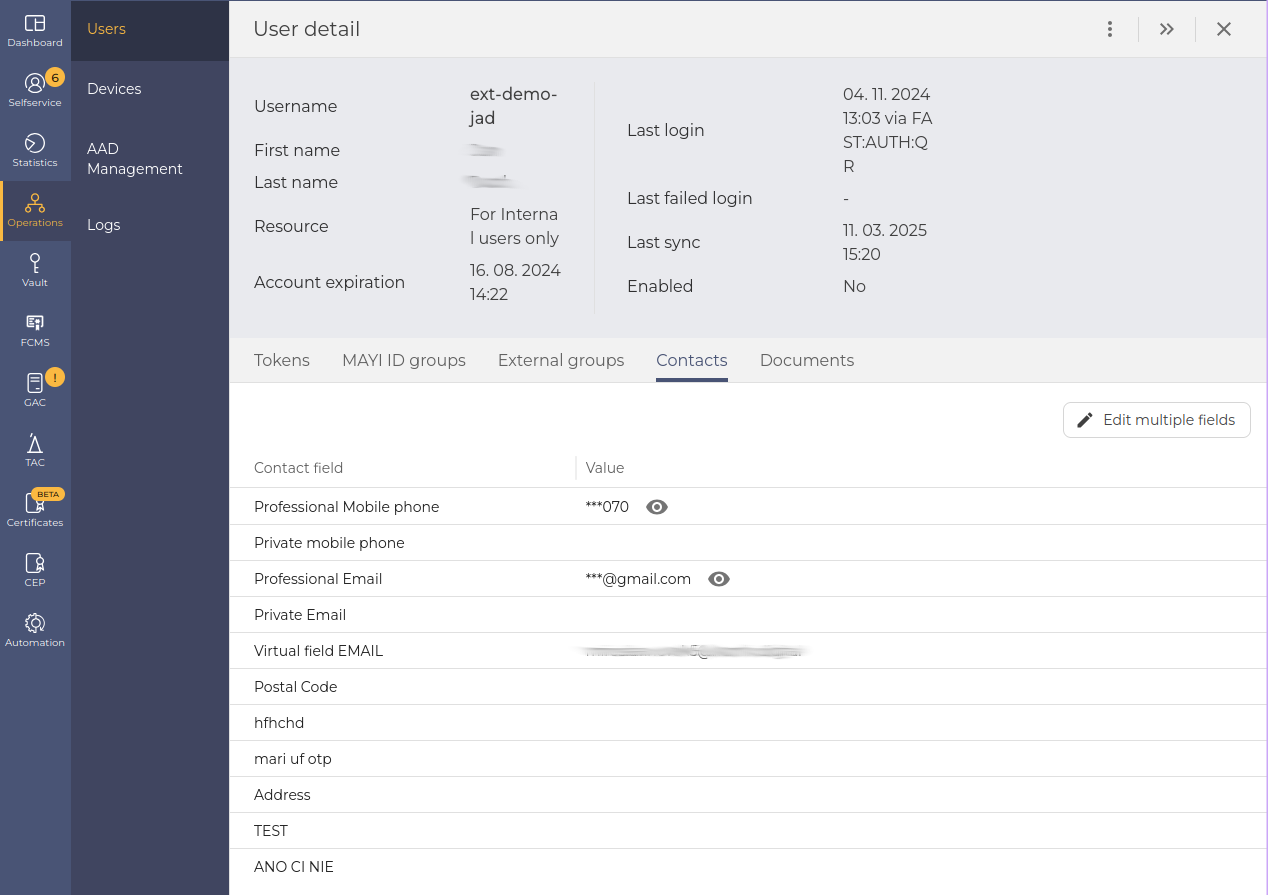
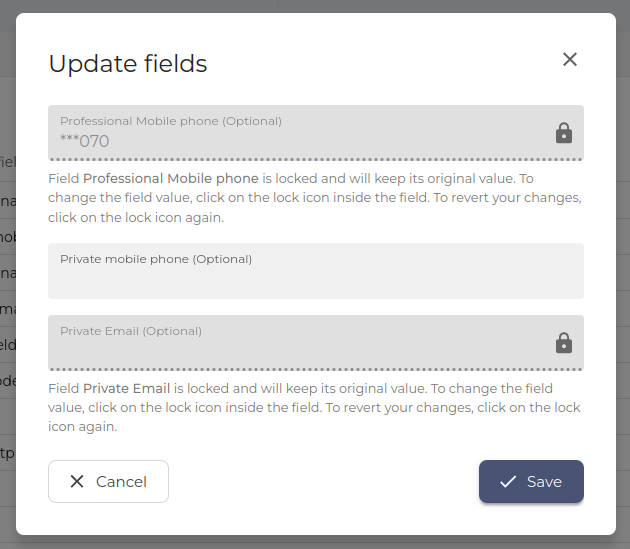
The operational console Operations / Users / Contacts has been changed to view the User contacts as a table for better visibility. Also, a modal window to edit user contact details was added for easier editing of multiple entries.
Vault - Secret templates ID upon secret creation
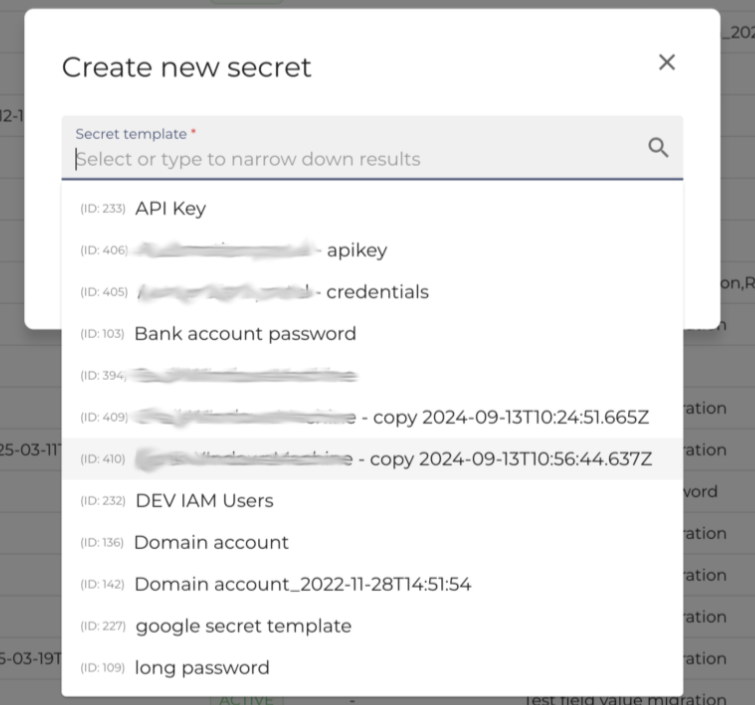
We have added the template ID for the selection of secret templates, because the name is not unique. As the secret template numbers were increasing, the risk of choosing the wrong template was increasing.
User Interface Elements
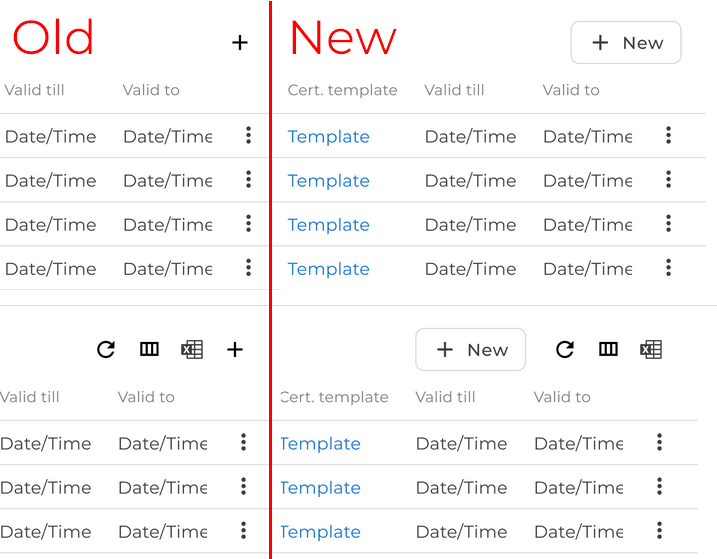
The paging selection is now saved as a user preference for all the main tables; tables excluded for now are expanded drawer tables and are expected to be included in the future.
April 23, 2025

Tenant Admin Console (TAC) - Translations
We have extended localisation options to empower native language usage. Every translatable element is now gathered and shown in the table in TAC. You can also import and export translations (for possible offline or Artificial intelligence translation) in an xlsx file.
Tenant Admin Console (TAC) - Email templates model update & expanded filter
There was a significant update to the template model, which prevents issues from tenant-specific settings and changes how the template engine relates to notifications. Thus, the filter was expanded with the Outdated option, now encompassing all the template states together with All, Active, and Draft to illustrate older templates better.
Dashboard - Copy and Navigation update
The Dashboard behaviour was changed to better illustrate and simplify the workflow. The most significant change is the Bookmarked dashboards were changed to Favorite dashboards. And new Dashboards can now be created inside of the All Dashboards tab.
Vault - Event subscription detail expanded
The detail view in the Event subtab now has information about filters and values.
User Interface Elements
Filters across the system's tables were enhanced to better show what filters are currently selected by the user, thus allowing for a simpler illustration of what is being shown in the table.
Tables were also changed to show — symbol where there is no value to be shown (null), to be more consistent throughout the system.
March 18, 2025

Tenant Admin Console (TAC) - Email template changes - Email Configurations
Default sender email settings were relocated to the Email Configurations tab. Operation-specific senders or email providers are now set in the Email Templates, empowering the administrators with easy set-up for each use-case.
Vault - Secrets - Search results expansion
We've enhanced the Search Results section in Secrets. It now allows for quick view of both Credential Status and Password Expiration, in the same table.
User Interface Elements
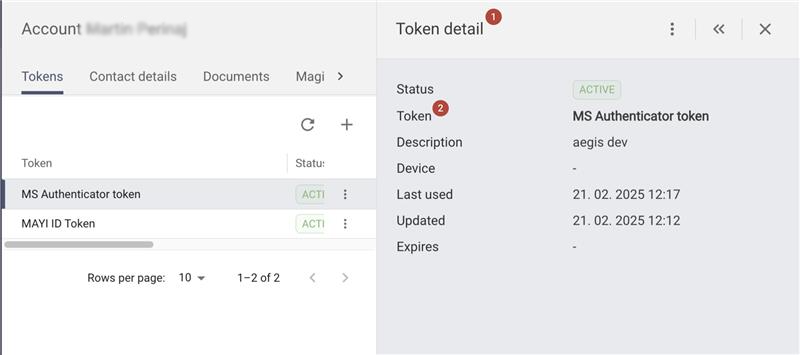
Consistent naming of the details for better navigation when switching between details.
1. Each detail header will feature a generic object name (eg "Token detail" when in Tokens).
2. The object name is then displayed and highlighted inside the main details section (eg, Token: MS Authentication token).
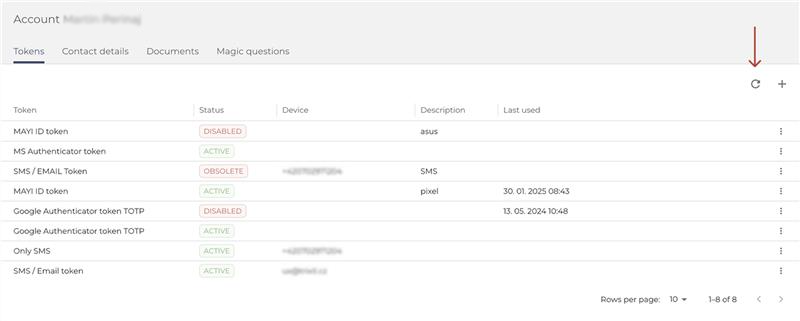
Refresh of the tables for fetching fresh data of the table only instead of refreshing whole page.
We added an option for fetching fresh data of the table only, instead of refreshing the whole page manually every time.
2024
December 17, 2024

ANT ID to MAYI ID Rebranding
ANT ID is now MAYI ID. Due to a trademark challenge, we’ve rebranded to better reflect our vision and values. Our new brand identity reflects our commitment to transparency, innovation, and security, ensuring we can continue delivering exceptional services without legal constraints. Discover our new