
Release Notes
Latest Releases
2026
October 27, 2026

CLM – Certificate Lifecycle Management
TLS v1.3 baseline for certificate provider connections. Every certificate provider connection now uses the TLS version configured on the provider instead of one compiled into each client. Every SwissSign, DigiCert, EJBCA, Microsoft AD CS and ACME CA provider is set to "TLS v1.3 preferred", which negotiates TLS 1.3 where the certificate authority supports it and falls back to TLS 1.2 otherwise. Because the fallback is silent, each provider now records the TLS version of its last successful connection actually negotiated and when, shown on the provider detail screen next to the configured setting. A connection test is available on all five provider types and reports the negotiated version.
Bulk revocation of certificates. A Certificate Administrator can select several certificates on the Tenant certificates grid and revoke them in one action, entering the reason and comment once. Each certificate still goes through the full single-certificate path, so privilege checks, per-template permission checks, the approval step and the audit entry all happen per certificate. The action processes every item rather than stopping at the first failure and ends with a per-item result summary.

Fixes. A user with no ownership of or permission on a certificate can no longer revoke it. A certificate requested through the webservice now takes a required SAN's default value instead of being refused as incomplete. Editing a template from the modal no longer silently switches off "Require configuration item during download". Certificates issued through an ACME template can now be revoked and superseded. Share certificate now generates a link for a contact without an e-mail address, and shows a proper message rather than a raw text key for a contact without a phone number.
Self-service
Bulk approval of certificate requests. An approver can select several pending certificate request approvals on My approvals and resolve them with a single optional comment. Other kinds of approval stay unselectable, and the action reports a per-item result.
Fixes. Approving and declining now require the matching privilege on the server, not only in the interface, so a user granted view-only access to approvals can no longer resolve them through the API. Decline is shown only to roles that hold the privilege and only while an approval is pending. Approvals can now be resolved from the dashboard widget, which previously refused every attempt, and that widget enforces the same privileges as the approvals page.
CEP – Certificate Enrollment
Fixes. NDES SCEP enrollment no longer fails with a false "invalid challenge": challenge verification is now fast and bounded regardless of how long a profile has been in use, consumes a challenge exactly once, and reports a truthful reason when a request is genuinely rejected. Expired challenges are purged daily. Scheduled tasks no longer stay in "Processing" when a certificate is revoked during the run.
Statistics
Monthly CLM licence usage as CSV. On Client statistics › CLM, the Download button now opens a dialog offering either the existing Excel export, preselected, or a licence-usage CSV for one closed month, defaulting to the previous month. The CSV has one line per active CLM licence with that month's billing figures — licence ID, licence name, template name, billing type, counting type and the billed number of units — matching the Billing statistics view, so month-end invoicing can be automated.
Fixes. A CLM licence's template name is shown instead of "Not Available".
User Interface
Fixes. The login page now shows the MAYI ID logo as the browser tab icon on testing and preprod, instead of the Red Hat icon.
October 6, 2026

CLM – Certificate Lifecycle Management
ACME CA connector. MAYI ID can now issue certificates through external ACME certificate authorities — Let's Encrypt, DigiCert, Sectigo, ZeroSSL, Google GTS, SSL.com and any other ACME-compliant CA. A tenant administrator configures an ACME Certificate Provider in Tenant Settings with the CA's directory URL, the EAB Key-ID and HMAC pair where the CA requires one, and an optional required profile offered from the CA's own metadata; saving creates and validates the ACME account, and Test Connection gives the same verdict without saving anything. Certificate templates route to the connector and inherit their domain, key and signature policy from the base template. Issuance then runs without human steps — order, DNS-01 challenge, validation and download — using a one-time CNAME delegation per domain. Credentials are never returned in plaintext.
Fixes. Where an EJBCA profile declares the same Subject DN component more than once, each repeat now carries its own default value and its own required/modifiable flags. Repeated values are also no longer dropped: Organization, Country, Locality and State/Province now reach the certificate authority in the order the profile declares them, the same as Organizational Unit already did, through the console and the webservice alike. A user who can see the Requests view can no longer reach a certificate they have no ownership or view permission on.
User Interface
CEP – Certificate Enrollment
Monitoring – filter by EST. The Requests view under Monitoring now offers EST in the Profile type filter, alongside SCEP, WSTEP, Intune and ACME, and the tenant's EST profiles appear in the Profile filter.
Statistics
Fixes. A CLM-type licence can be created again: the Template selector lists the tenant's templates instead of coming up empty.
September 15, 2026

CLM – Certificate Lifecycle Management
AD CS certificates built from Active Directory. CLM now supports the stock User, Computer and Domain Controller templates, where the certificate authority builds the subject and SANs from an Active Directory principal. The requester enters an AD principal and a target type, which CLM verifies against the directory before accepting the order.
Template validation against the EJBCA profile. An EJBCA-backed template is now checked against its End Entity Profile at save time, instead of failing later at issuance.
Automatic clean-up of stuck requests. Requests orphaned in "Processing" are now terminated automatically where it is safe to do so, and can be cancelled from the Requests view.
Other fixes and improvements. Certificate scanning, ordering through the webservice, DigiCert provider creation, the AD CS lifecycle actions and the API documentation have all been corrected.
CEP – Certificate Enrollment
EST marked as Beta. EST enrollment now carries a BETA badge in the CEP menu ahead of general availability.
Other fixes and improvements. EST profile updates keep the connector's issuing-CA chain, and an enrollment challenge can no longer be generated empty.
IAM – Identity & Access Management
Other fixes and improvements. Username-based login, repeat enrollment, group member and role counts, and console start-up after an interrupted migration are all resolved.
User Interface
File uploads filtered by type. Upload dialogs — AD CS provider keystores, CEP certification authorities and others — now restrict the file picker to the expected formats, instead of accepting any file and failing afterwards.
August 25, 2026

CEP – Certificate Enrollment
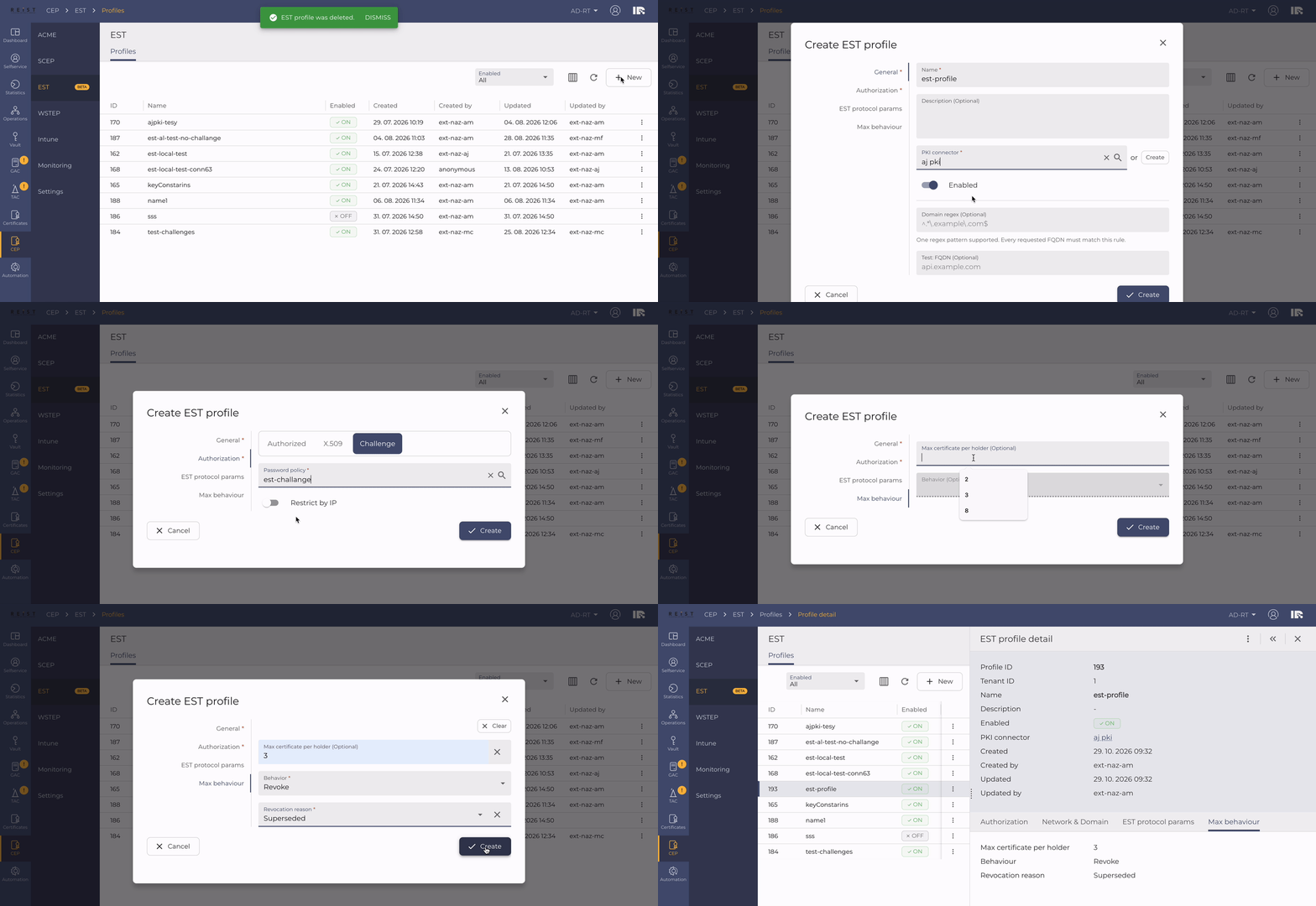
EST Enrollment (RFC 7030). The CEP now supports EST as an enrollment channel alongside SCEP, WSTEP and ACME, aimed at network and IoT equipment that cannot use the other protocols. Operators create and manage EST profiles from the CEP console — choosing an authorization mode (Authorized, X509 or Challenge), a PKI connector, DNS-domain constraints, an IP whitelist and a renewal period — and can supply the issuing-CA chain on the connector. Devices enroll and renew through it, and where required the key pair is generated server-side and escrowed. CLM's certificate templates and the Add certificate view support EST-backed templates with one-time challenge generation, mirroring the existing SCEP flow.
CLM – Certificate Lifecycle Management
Webservice parity for automation. The CLM external webservice now implements the operations existing certificate automations rely on, so Ansible playbooks, the CEP and other API clients keep working unchanged against CLM. Certificates can be read, searched, filtered by owner and listed by expiry; downloads honour every supported format — chain only, or chain plus encrypted key — and an unsupported format is rejected with a clear error instead of silently returning a bundle without the key. Certificates can be deleted whole or by single version, and templates can be listed and inspected.
Fixes. Microsoft AD CS templates can now be duplicated, and AD CS certificates can be ordered, revoked and renewed like those of the other providers. Enrollment against EJBCA through the webservice works again, with the profile's default subject fields applied automatically when a request omits them. A template that declares the same field more than once no longer repeats the first field's data, and a certificate with a renewal already in progress can no longer be requested again through the API while the first request is still running.
Statistics
Fixes. Deleting an FCMS provider configuration now removes it from the list immediately, without a browser refresh, and the "FCMS data requests update" scheduled task completes without errors.
August 4, 2026

CLM – Certificate Lifecycle Management
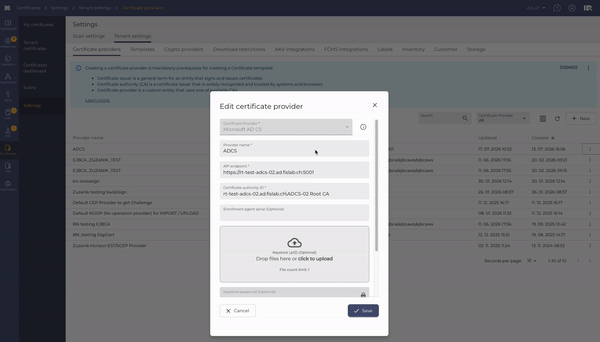
Microsoft ADCS Connector. CLM now supports Microsoft Active Directory Certificate Services (ADCS) as a certificate authority, alongside EJBCA, DigiCert and SwissSign. Administrators can register and test an ADCS connection, and certificates can be requested, issued and revoked through it just like with the other supported providers.
User Interface
Out of Beta. The Certificate Application is no longer marked as a beta feature and is now part of the standard CLM experience.
Interface. Fixed a duplicated password-visibility icon shown in Microsoft Edge, and a navigation issue that could block moving between sections after viewing certain details.
CEP – Certificate Enrollment
Monitoring – Filter by ACME Profile. Certificate requests in the monitoring view can now be filtered by the ACME profile type, matching the filters already available for other protocols.
July 14, 2026

IAM – Group Management
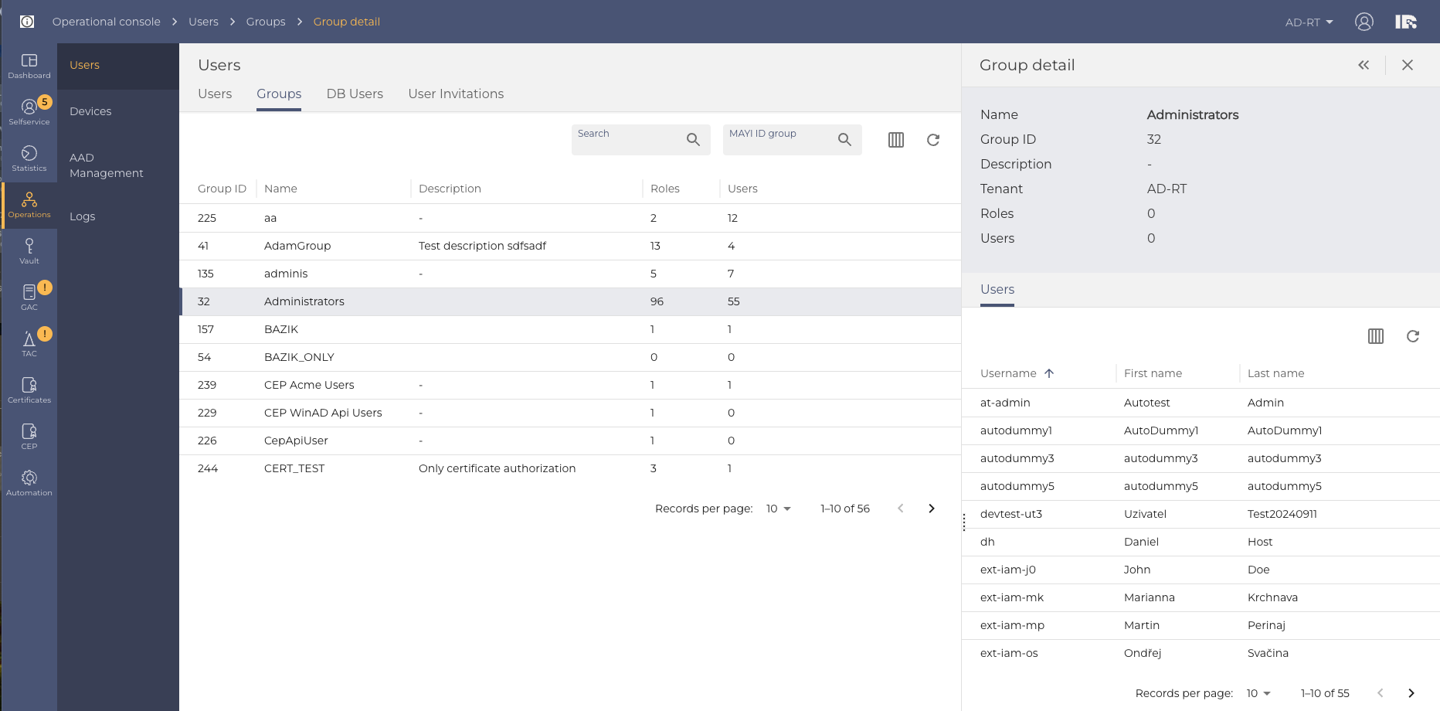
Dedicated Groups Menu. Operators and auditors now have a dedicated Groups section in the operational console. From there, a group's members can be browsed in a searchable list, and users can be added to or removed from a group in bulk, in a single action.
Vault – Secrets
Responsive Secret Detail on Mobile. The secret detail page is now fully readable and usable on small screens such as phones. Secret values (for example, a Wi-Fi password) can now be viewed and copied to the clipboard from any device.
CLM – Certificate Lifecycle Management
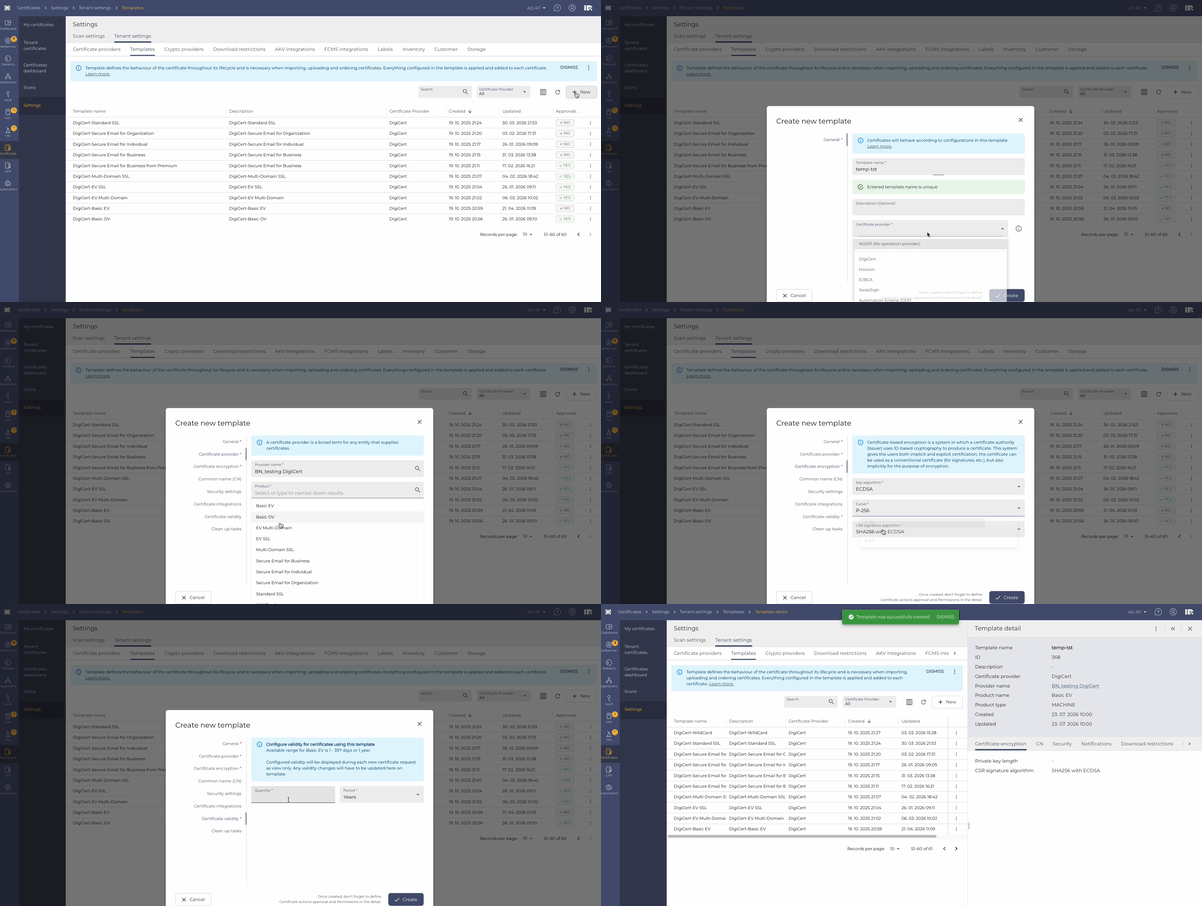
ECDSA / ECC Certificate Support. Certificates can now be ordered using ECDSA algorithms (P-256, P-384, P-521), in addition to RSA. When configuring a certificate template, administrators can choose the desired algorithm and curve, with the platform automatically limiting options to what the connected provider supports. ECDSA certificates can be ordered end-to-end through both EJBCA and DigiCert.
External Channel Notifications – Jira & ServiceNow. Certificate lifecycle events can now trigger notifications to external ticketing systems. Administrators can configure Jira or ServiceNow as a notification channel and select which certificate templates use it.
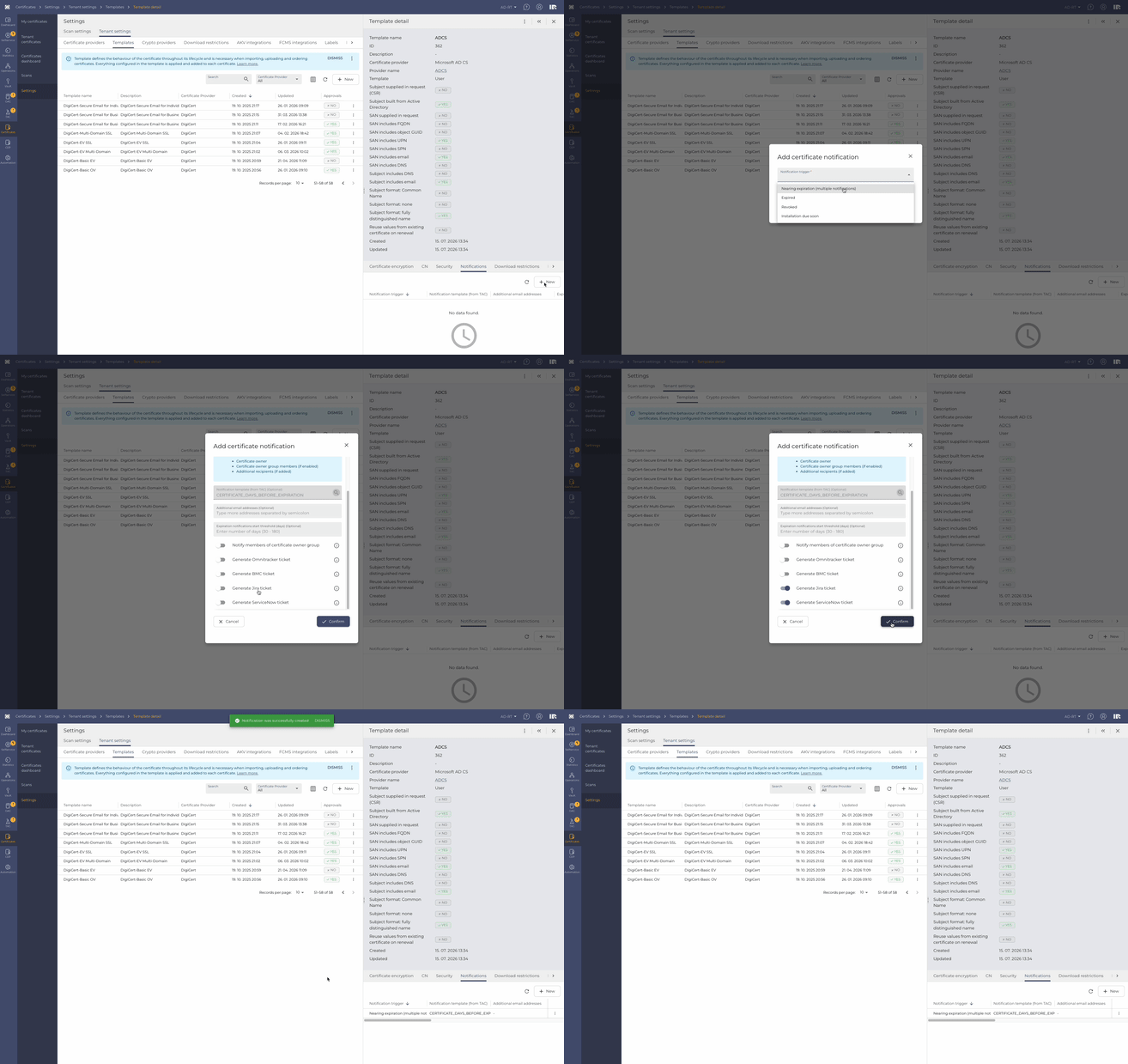
Fixes
Certificate Templates & Requests. Several issues affecting certificate templates and requests have been resolved: templates with no notifications configured now load correctly, an invalid private-key password no longer causes an unexpected error, and creating a license no longer fails when a certificate template has no description.
June 9, 2026

CEP – ACME Certificate Enrollment
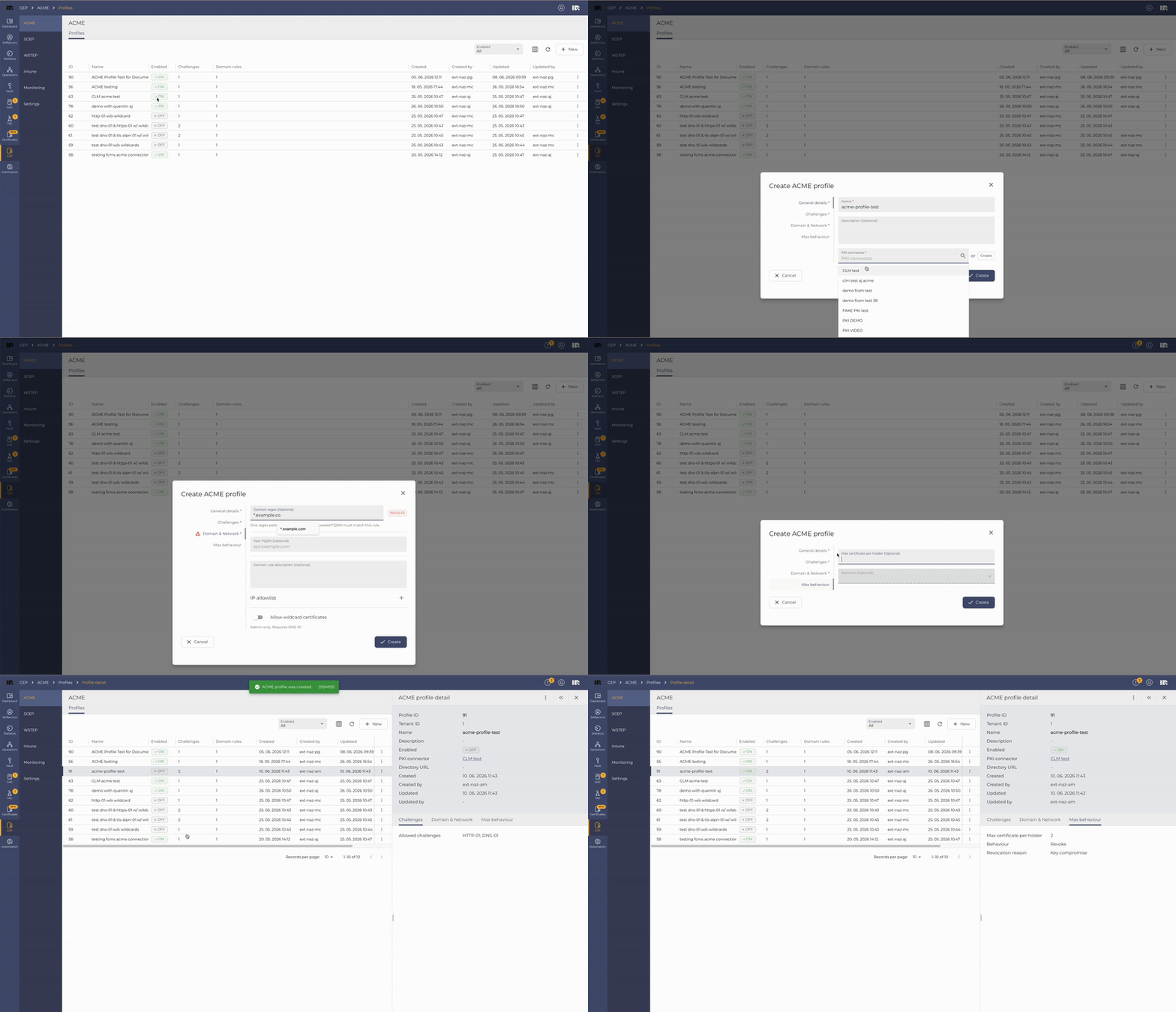
CME Certificate Profiles. Administrators can now create and configure ACME certificate profiles, defining the rules under which certificates will be issued to devices and applications. The configuration follows the same familiar structure as other profile types in the platform.
ACME Certificate Issuance. Devices and applications can now request certificates through the ACME protocol, using the profiles configured by administrators.
ACME Rejection Monitoring. Rejected ACME certificate requests are now visible in the platform monitoring view, making it easier for administrators to detect misconfigured clients or invalid requests.
May 5, 2026

CLM – Certificate Lifecycle Management
Certificate Dashboard. A new dashboard gives CLM users a complete overview of all tenant certificates in one place, with charts and filters to easily monitor and analyze their status.

Scanner – Scan a Single URL. Users can now add a new scanner by simply pasting a URL into a text field, without needing to prepare and upload a file.
Notifications for Imported Certificates. It is now possible to set up email notifications for imported certificates based on their expiration date, so users can track upcoming expirations and act on time.
Template – Make a Copy. Users can now duplicate an existing template with one click, making it faster to create new templates without starting from scratch.
Certificate Ownership Change – Approval & Permissions. When a certificate changes ownership, the approval process is now automatically triggered and user permissions are updated accordingly.
User Interface
Detail Panel Refresh. After Filtering Fixed an issue where the detail panel could display outdated information after applying filters in a table.
January 20, 2026

Tenant Admin Console (TAC) + Global Admin Console (GAC) — Scheduled Task Monitoring
Tenant/Platform Monitoring was extended with an overview of Scheduled Tasks with options to control them, for each scheduled task there are actions available (Reschedule, Execute, Pause, Resume). This provides even stronger control over the system for Administrators. Global alert badges were also extended with notification to failed tasks.
2025
December 9, 2025

User Interface Elements
User preferences individual category reset
We have enhanced the reset user preferences experience by adding the option to reset each category separately, so the user doesn't have to go back to full default settings.
November 18, 2025

Operational Console - Invitation improvement
The invitation process in Operational console was enhanced with auto-completion for invitation templates.
October 29, 2025

User Interface Elements
Information header dismissal
We have added an option for the users that can permanently hide individual information banners. This can be reverted by resetting the user preferences in the profile.

October 6, 2025

User Interface Elements
Entity status was re-done as a system-wide update to help with consistency and to also show if the user action is necessary at the moment.
September 16, 2025

Access Management - Operations - Invitations superadmin
We have added an option for admins to see all invitations created in a tenant. In the table you can see invitation details (name, email, phone, etc.) as well as the user who created the invitation. The reason for this: When an invitation creator is away or cannot access their account, the invitation cannot be updated nor seen by other users who might need it.
Timezone system adjustments
We have redefined how the system handles the timezones. The system used to work on the Swiss time, regardless of where the user was, now the system adapts to the user's timezone (and summer/winter time) and provides relevant information. This can have beneficial effects on certificate management and overall understandability of the time accurate information.
User Interface Elements
Object Interlinking
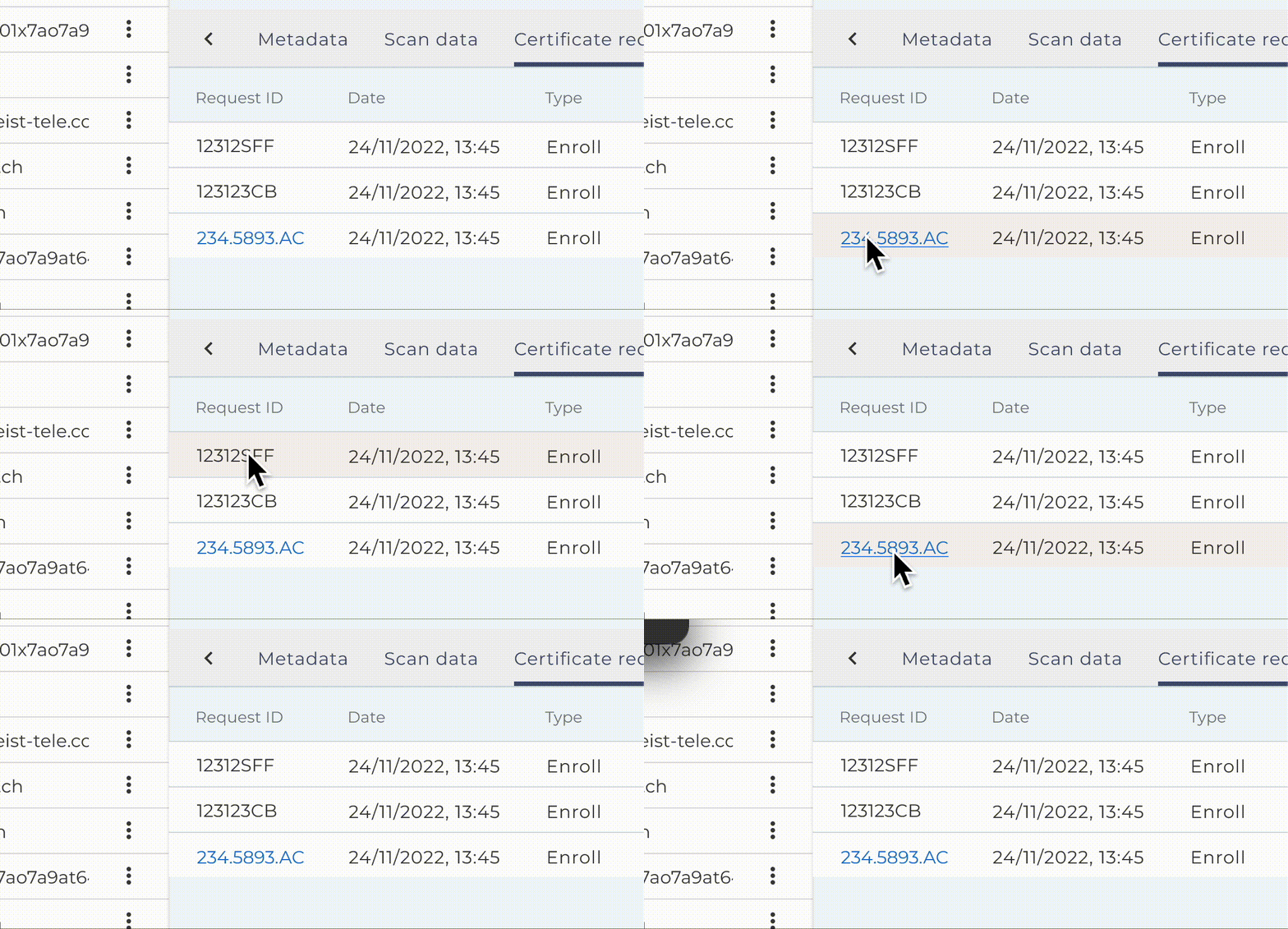
We have introduced changes, that eliminate unnecessary steps in users' workflow. When looking at detail that contains other entities in the system, the option to click them as a link to said entity was added, without the need to go to the related part of the system and search for them.
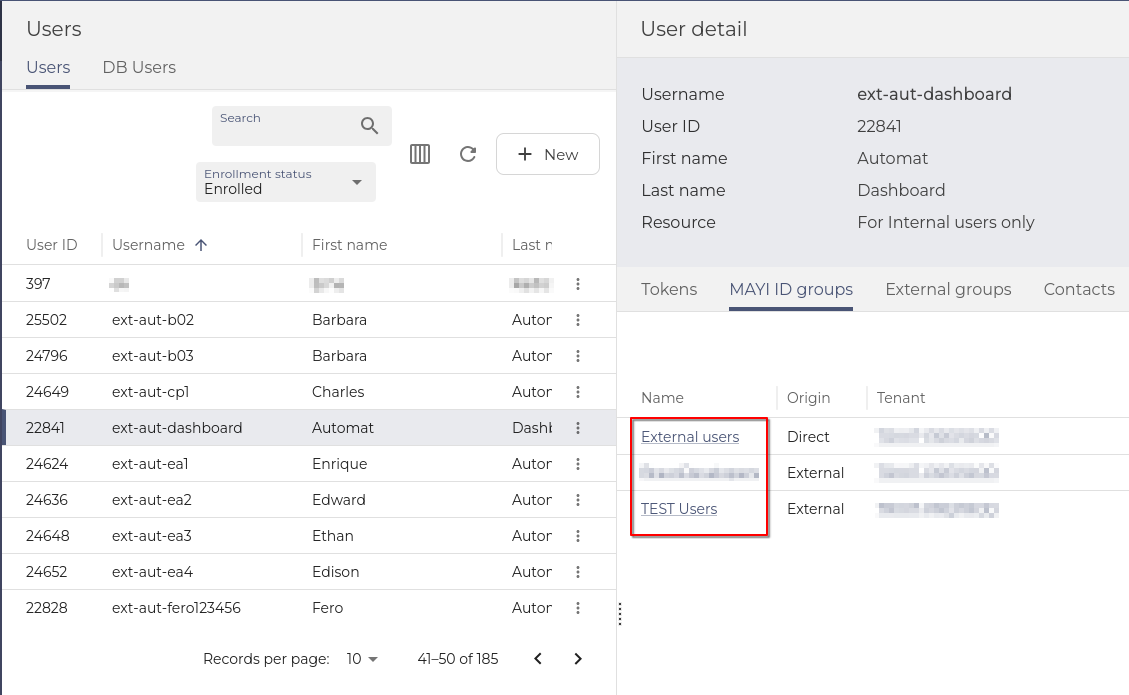
With RBAC and privileged access in mind, users can see the links only for entities, they have privileges to.
Invitations unification
Changes were made, so the table columns in My Invitation in SelfService looks the same as All Invitations in Operations.
August 26, 2025

Vault - linking the entities
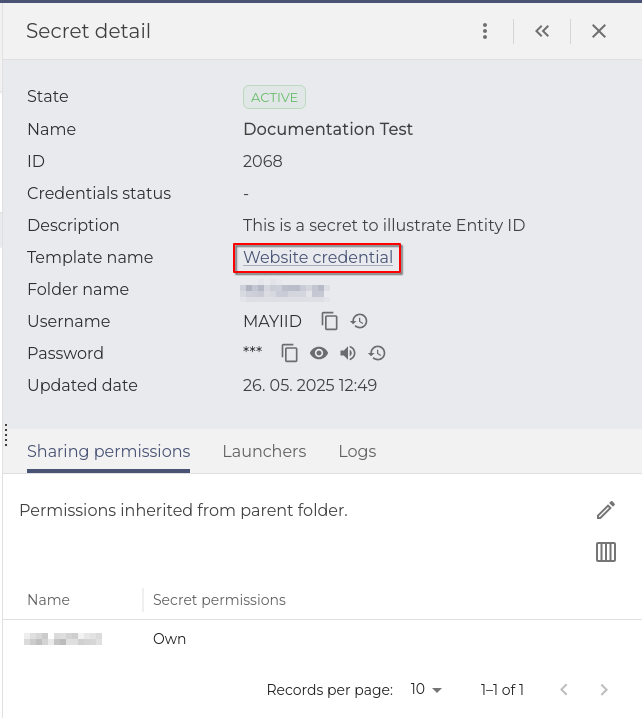
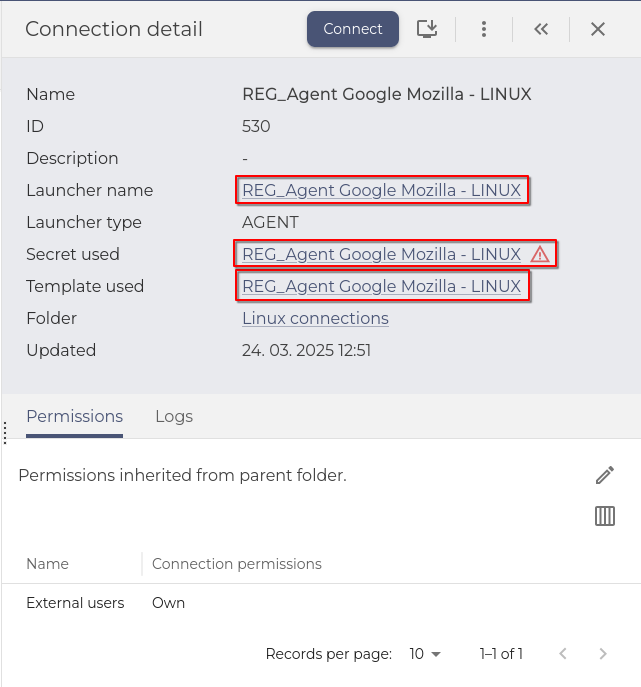
When in Vault, users can now use the full potential of interlinked objects in the Vault. In Secret's Detail, templates or connections can be clicked as links to the entities of the system. This eliminates the need to search for templates, connections, etc. to find out the properties of the linked items.
 |
 |
vSEC device functionalities decommissioned
All vSEC functionalities were decommissioned in this release.
Tenant Admin Console (TAC) + Dashboard - Default icons for applications
Application icons were added to represent the MAYI ID applications and miscellaneous (Keycloak, Safewalk, ...). The icons are corresponding to the left menu icons.
User Interface Elements
Filters and the action bar changed to stick to the top of the table
We have enhanced the experience with tables with many entries. Filtering and control elements now stick to the top part of the table when the user scrolls down the table.
Dashboard widgets were polished
Dashboard creation was enhanced with better descriptions, and the widgets default width and height were changed to fit the dashboard screen better. Paging of the widgets was redefined from rows per page to records per page. Those changes should provide cleaner dashboards with more intuitive creation.
Global reset of user preferences
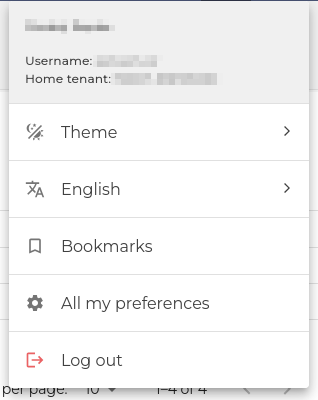
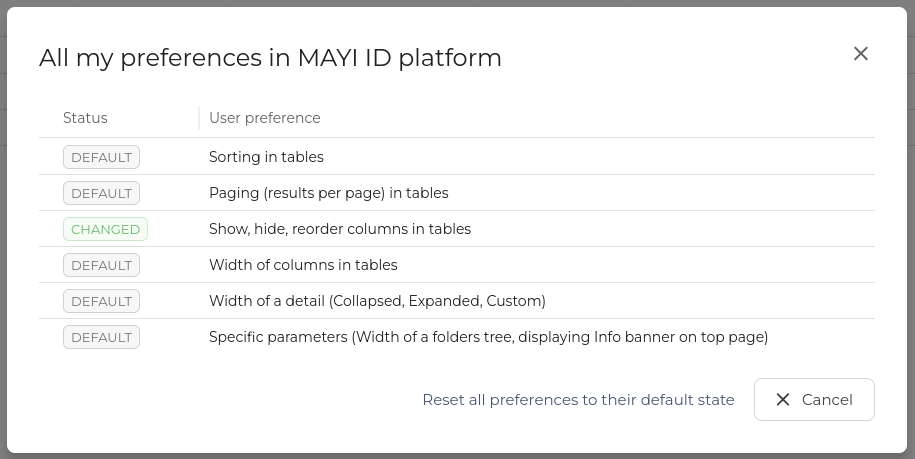
In the previous release, we introduced table column customization and a reset mechanic. It was decided to also introduce a global reset option that can be found in the Profile section of the top bar. In the section All my preferences. Users can also see what type of changes they have made to their tables.
Checkboxes and selectors consistency
When selecting checkboxes, radio buttons, or switches, users can now also click the text to make a selection, not just the selector.
July 15, 2025

Enrollment — Security questions flow unification
Adding security questions in the enrollment process was changed to be the same as in Selfservice, unifying the workflow and not confusing the user with two methods for the same process.
User Interface Elements
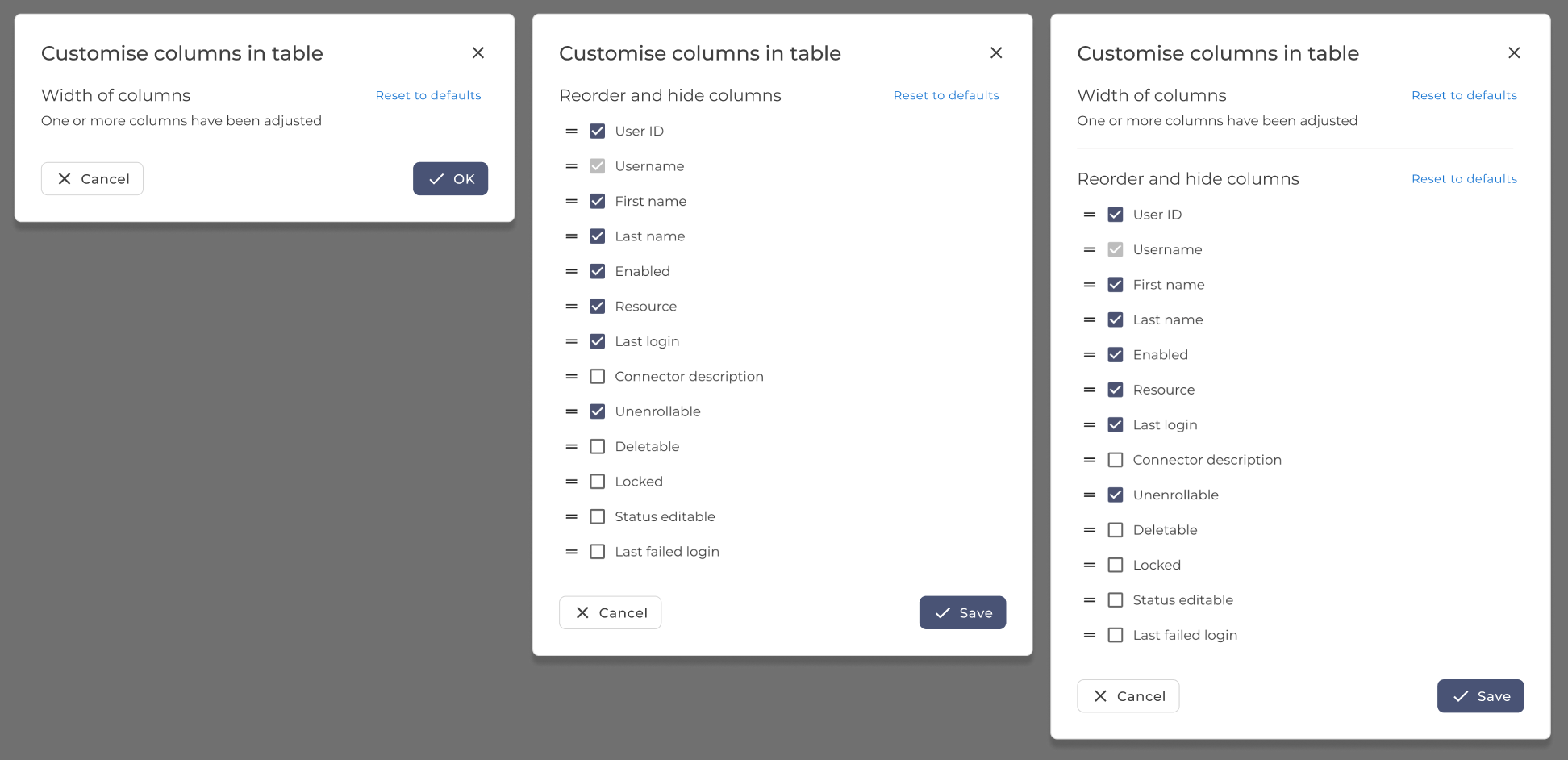
Table column customization changes and reset
The option to reset user column changes (column width) was added, and in the case of the table with customizable columns, also hidden and reordered columns can be reset to defaults.
Expandable drawer persistence changes
The expandable drawer size is now consistent for each page separately. Making the customization more useful for more uses and applications.
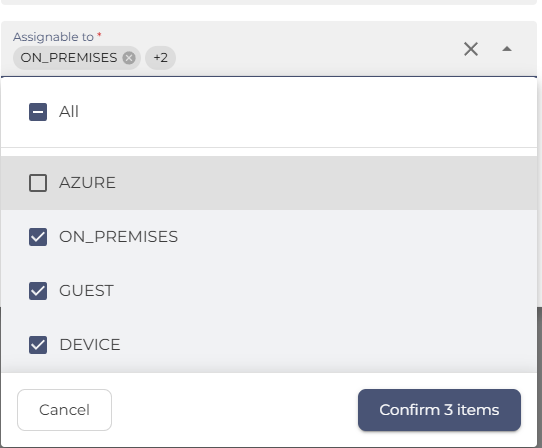
Autocomplete multi-select input
The autocomplete multi-select input was greatly improved to ease the use of multi-select. Users can now check and uncheck entries and use autocomplete to search for them in long lists. The all items choice might not always be displayed because the system does not fetch all items for security reasons.
Unselect all from multiple pages
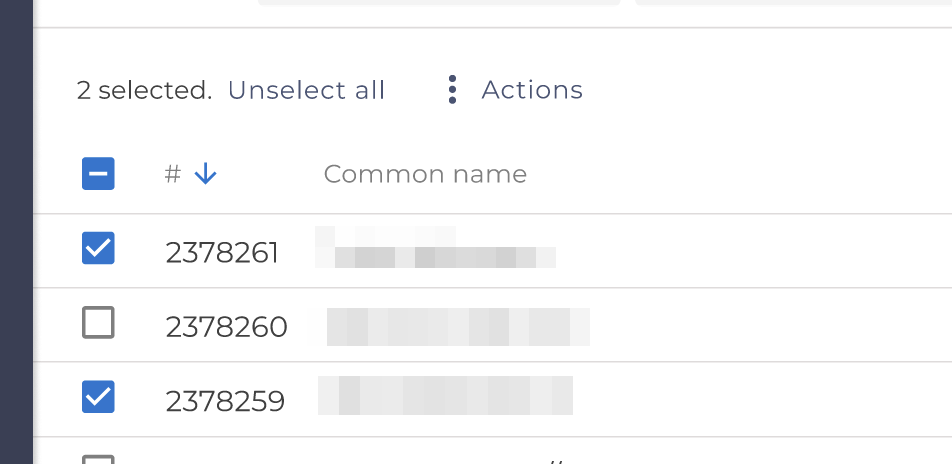
When the user has selected items on multiple pages in a table, an unselect button will show up to allow the user to unselect all.
User preference storage changes
We changed how the system stores user preferences, with most settings saved in the local storage. Column settings in the main tables, GUI Theme and bookmarks saved in the system.
List selection updates
List selections were changed to separate All and None selectors from the rest. Some lists were enriched with icons, for more intuitive orientation.
June 24, 2025

Verification Questions renamed to Security Questions
To comply with standards of industry and branding, we renamed the Verification questions to Security questions everywhere in the system.
User Interface Elements
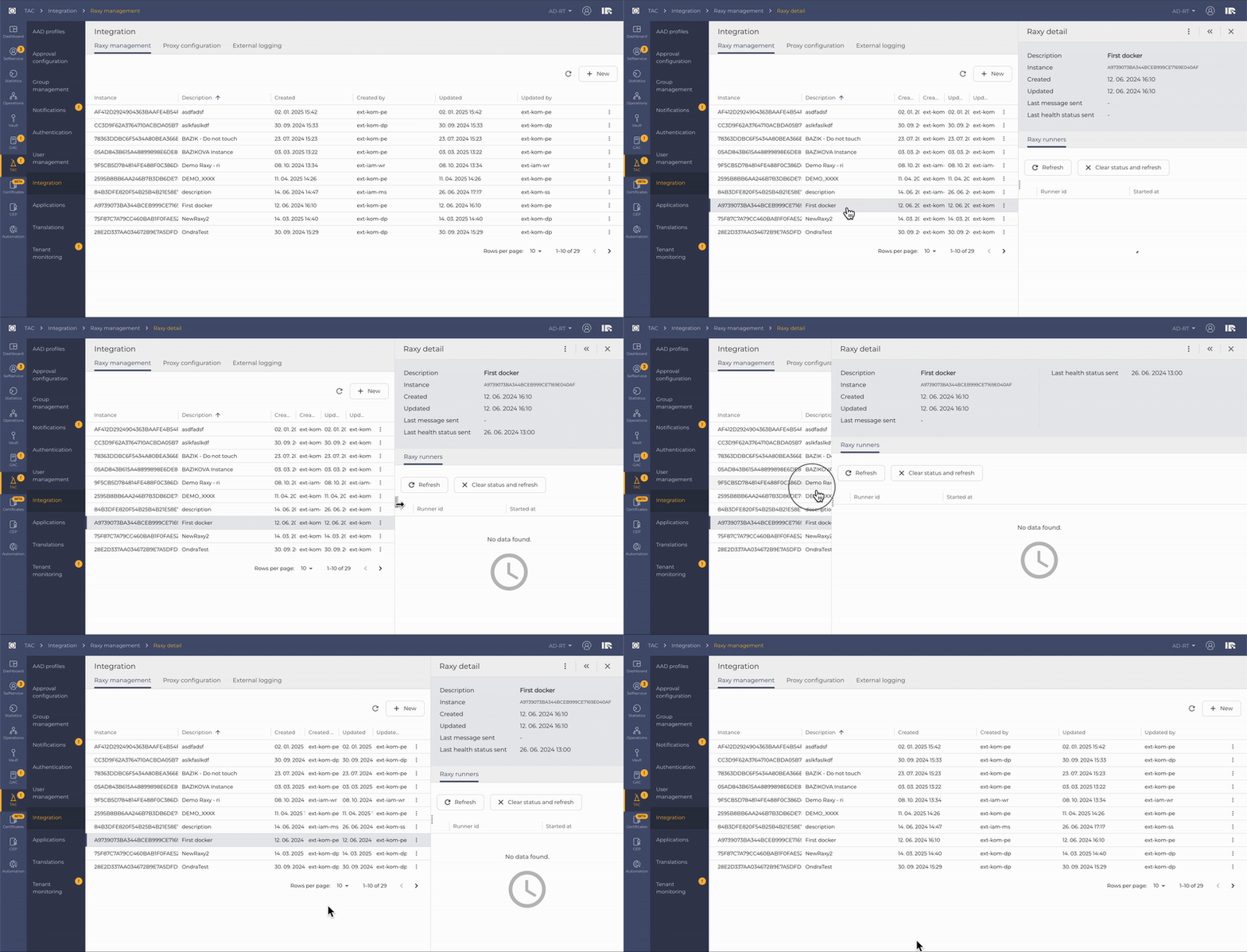
More intuitive and easy way to work with the expandable drawer feature — Expandable drawer can be now resized depending on user preference by dragging it left or right
June 3, 2025

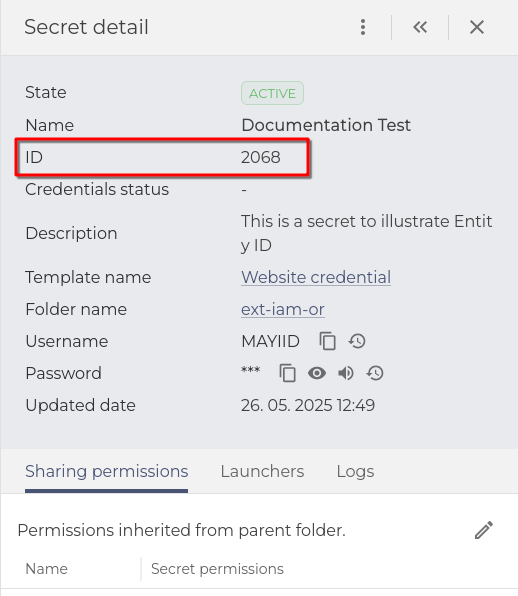
Vault - Display Entity ID in Detail
We decided to clearly show the IDs of vault entities. Mostly because the ID is the unique identifier for most vault items, and names can be the same or similar, which can make it confusing for admins and users with privileges to see many entities. This will also be useful in the future for the Automation Portal.
User Interface Elements:
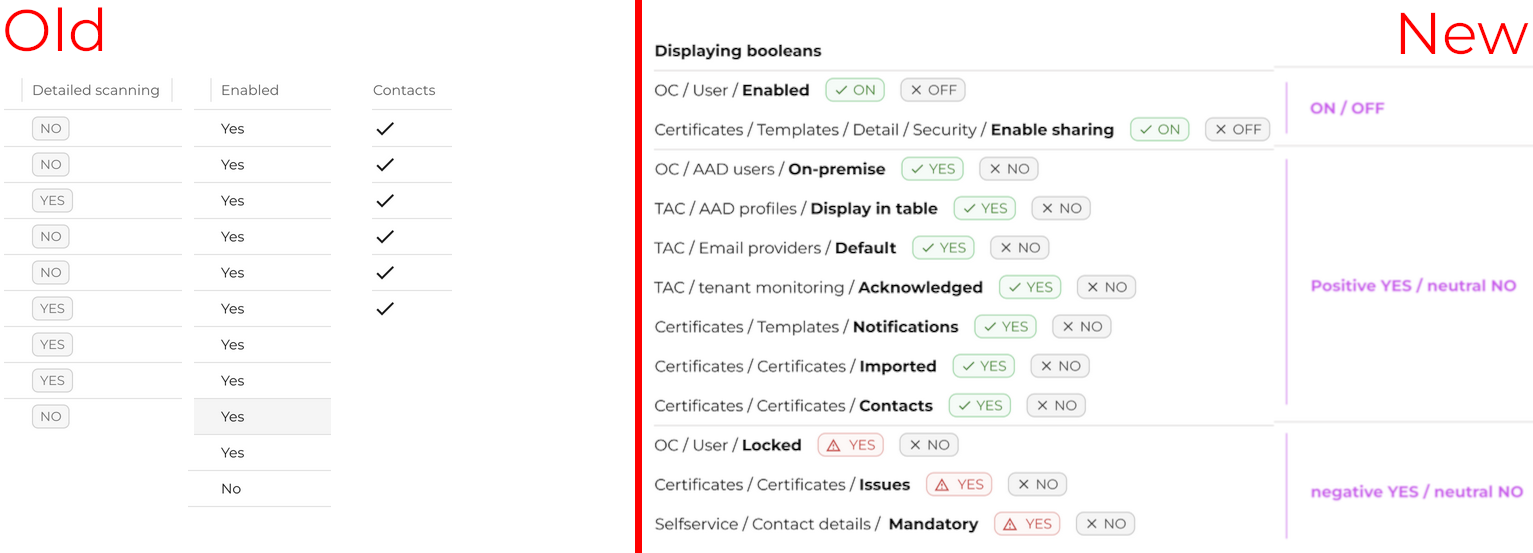
Displaying Booleans in tables -
A System-wide upgrade was put in place to better illustrate Boolean values in tables. The values now, by default, express positive/negative states in a more understandable way. For example, a locked user is now gray if not locked (default) and red with an exclamation mark if locked.
Change tables to cards -
Tables that can contain only one item were changed to cards; this hints to the user that there can only be one entry while making the text more readable.

May 13, 2025

Magic questions to Verification questions - unification throughout the system
The name of the feature was unified with the Administrator terms, thus changed to Verification Questions in every platform module containing this feature:
-
- Selfservice
- Tenant Admin Console - TAC
- Enrollment
- Emergency Access
- Automation Portal
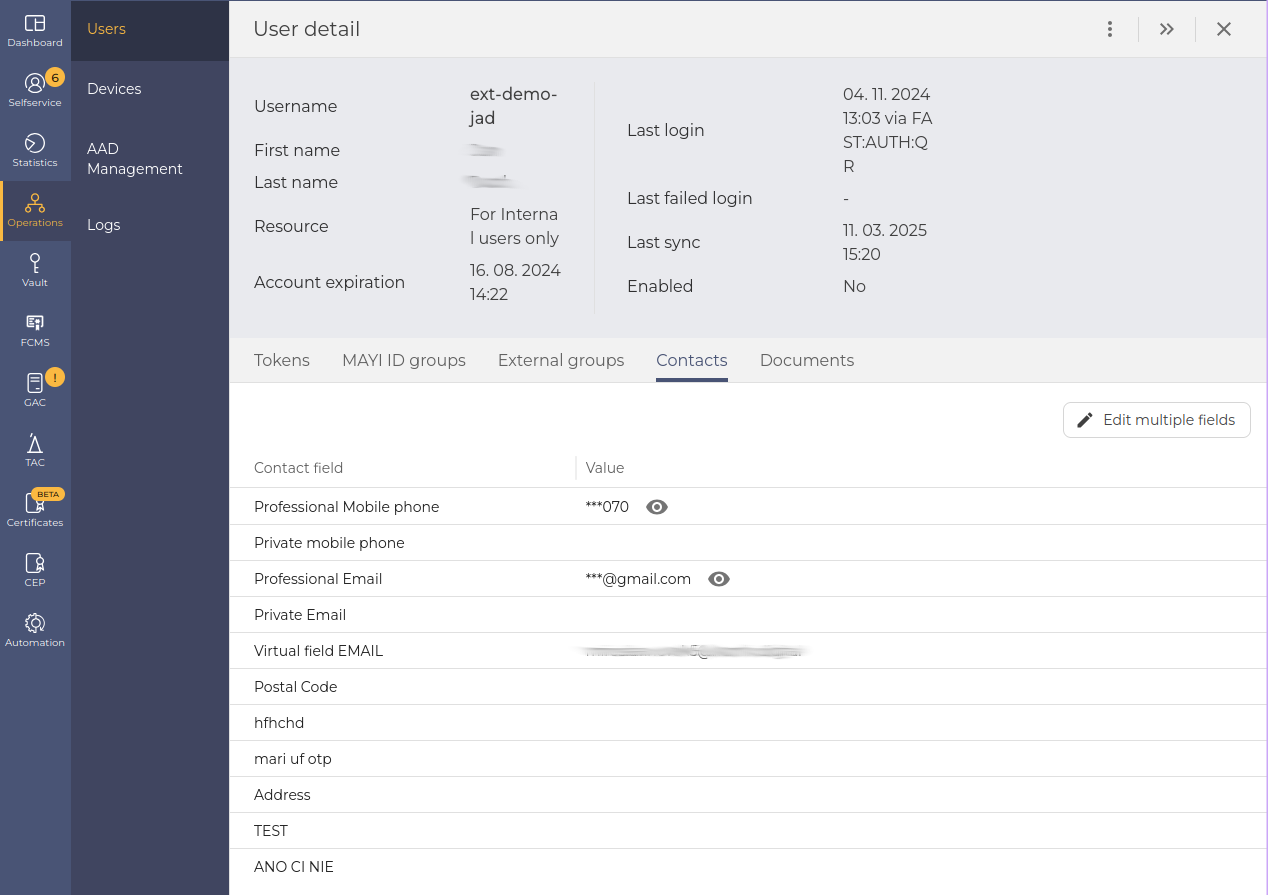
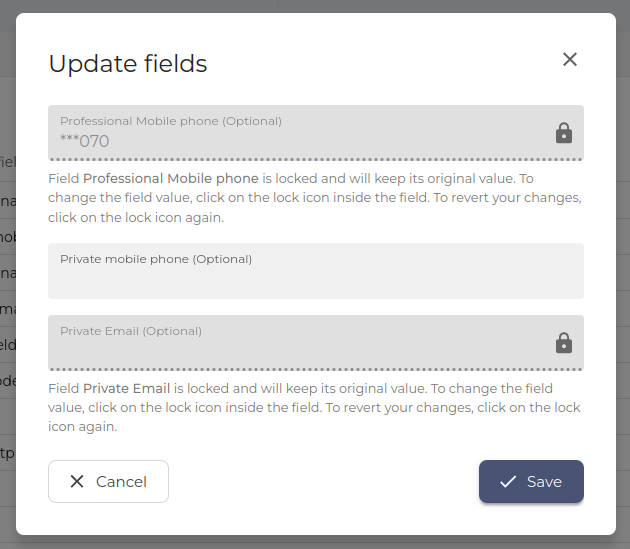
Operational Console - Contacts displayed in the table
The operational console Operations / Users / Contacts has been changed to view the User contacts as a table for better visibility. Also, a modal window to edit user contact details was added for easier editing of multiple entries.
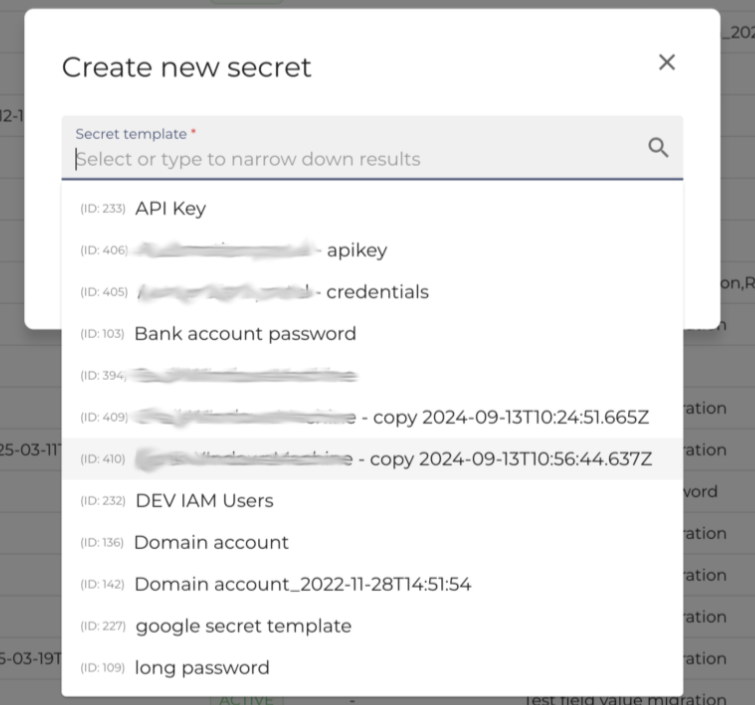
Vault - Secret templates ID upon secret creation
We have added the template ID for the selection of secret templates, because the name is not unique. As the secret template numbers were increasing, the risk of choosing the wrong template was increasing.
User Interface Elements
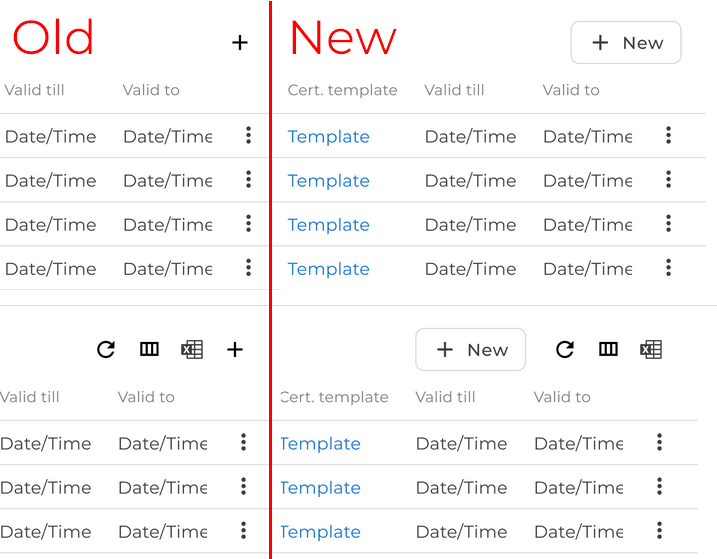
The paging selection is now saved as a user preference for all the main tables; tables excluded for now are expanded drawer tables and are expected to be included in the future.
April 23, 2025

Tenant Admin Console (TAC) - Translations
We have extended localisation options to empower native language usage. Every translatable element is now gathered and shown in the table in TAC. You can also import and export translations (for possible offline or Artificial intelligence translation) in an xlsx file.
Tenant Admin Console (TAC) - Email templates model update & expanded filter
There was a significant update to the template model, which prevents issues from tenant-specific settings and changes how the template engine relates to notifications. Thus, the filter was expanded with the Outdated option, now encompassing all the template states together with All, Active, and Draft to illustrate older templates better.
Dashboard - Copy and Navigation update
The Dashboard behaviour was changed to better illustrate and simplify the workflow. The most significant change is the Bookmarked dashboards were changed to Favorite dashboards. And new Dashboards can now be created inside of the All Dashboards tab.
Vault - Event subscription detail expanded
The detail view in the Event subtab now has information about filters and values.
User Interface Elements
Filters across the system's tables were enhanced to better show what filters are currently selected by the user, thus allowing for a simpler illustration of what is being shown in the table.
Tables were also changed to show — symbol where there is no value to be shown (null), to be more consistent throughout the system.
March 18, 2025

Tenant Admin Console (TAC) - Email template changes - Email Configurations
Default sender email settings were relocated to the Email Configurations tab. Operation-specific senders or email providers are now set in the Email Templates, empowering the administrators with easy set-up for each use-case.
Vault - Secrets - Search results expansion
We've enhanced the Search Results section in Secrets. It now allows for quick view of both Credential Status and Password Expiration, in the same table.
User Interface Elements
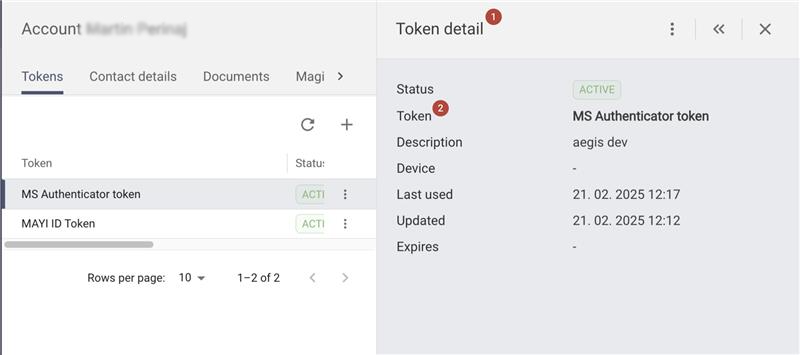
Consistent naming of the details for better navigation when switching between details.
1. Each detail header will feature a generic object name (eg "Token detail" when in Tokens).
2. The object name is then displayed and highlighted inside the main details section (eg, Token: MS Authentication token).
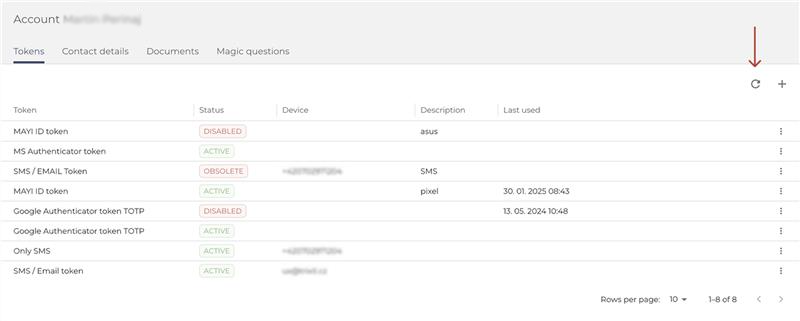
Refresh of the tables for fetching fresh data of the table only instead of refreshing whole page.
We added an option for fetching fresh data of the table only, instead of refreshing the whole page manually every time.
2024
December 17, 2024

ANT ID to MAYI ID Rebranding
ANT ID is now MAYI ID. Due to a trademark challenge, we’ve rebranded to better reflect our vision and values. Our new brand identity reflects our commitment to transparency, innovation, and security, ensuring we can continue delivering exceptional services without legal constraints. Discover our new